

Description
3CX Web Client
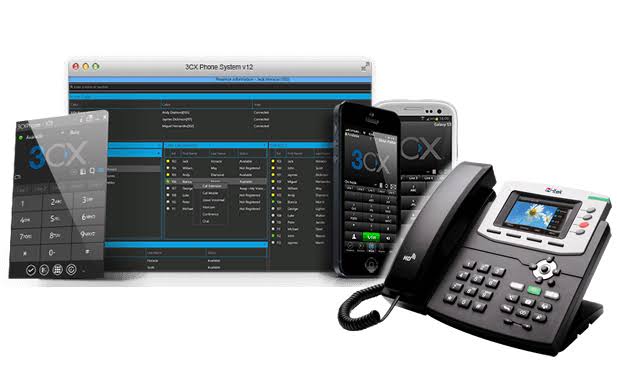
3CX Web Client is a browser-based communications application that gives you access to all of your business calls, messages, video meetings, contacts, and voicemail all in one place. It works as an extension of the 3CX Phone System, letting employees control business communication without downloading any desktop software. Users are able to place and receive calls, access colleague availability, transfer calls, and manage customer calls from within a supported browser.
The Web Client is ideal for businesses throughout the UAE and GCC, allowing for seamless communication between the office staff, remote employees, and other customer-facing teams. It brings together key telephony and collaboration features and eliminates the need for several communication apps. Netmate IT can assist you in deploying and configuring your 3CX solutions, depending on your organisation’s communication and infrastructure needs, such as Web Client access, user extensions, and supported integrations.
Key Features of 3CX Web Client
1. Browser-Based Calling and Communication
The 3CX Web Client provides a built-in dialer for making and receiving business calls directly through a web browser. Employees can search contacts, dial extensions, transfer calls, and manage active conversations without switching applications. It also supports Progressive Web App (PWA) installation through Google Chrome and Microsoft Edge, providing an application-like desktop experience.
2. Real-Time Team View and Presence Management
The Team View displays colleague availability, extension status, and active calls through a centralized interface. Employees can check whether colleagues are available before transferring calls or starting conversations. Receptionists can use this visibility to manage incoming calls and direct customers to the appropriate departments. The interface also offers compact and comfortable viewing modes.
3. Integrated Business Messaging
The Web Client allows employees to exchange internal messages and manage supported customer conversations from one interface. It supports communication through website live chat, WhatsApp, Facebook, and SMS, depending on the configured services. Employees can handle incoming conversations, transfer chats to other users, and maintain communication without relying on multiple separate messaging applications.
4. Video Conferencing and Online Meetings
The 3CX Web Client includes the Meet feature for starting and scheduling audio and video conferences. Employees can create meetings, share invitation links, and invite internal or external participants. It supports browser-based collaboration without requiring every participant to install a dedicated desktop conferencing application. This helps distributed teams conduct meetings and coordinate business activities.
5. CRM Integration and Click-to-Call
The Web Client integrates with supported CRM platforms to connect customer information with business calls. It can identify incoming callers, retrieve customer records, and log call activities. The Click2Call browser extension for Chrome and Edge also converts supported phone numbers on websites and CRM pages into clickable links, allowing employees to initiate calls without manually entering numbers.
6. Call History, Voicemail and Notifications
The Web Client provides access to call history, voicemail, and available call recordings. Employees can review missed calls, listen to voicemail messages, and access previous communication activities through the interface. Browser notifications also alert users about incoming calls and chats, subject to browser permissions and notification settings. This helps employees stay informed about business communication activities.
Supported Products/Platforms
| Product / Platform | Role |
| 3CX Web Client | Browser-based interface for business calls, messaging, and collaboration |
| 3CX Progressive Web App (PWA) | Application-like desktop access through supported browsers |
| 3CX Click2Call Extension | Initiates calls directly from supported websites and CRM platforms |
| 3CX Mobile Applications | Extends business communication access to iOS and Android devices |
| CRM Integrations | Connects customer records, caller identification, and call logging with the Web Client |
Common Use Cases
The 3CX Web Client can be used to meet the communication needs of various businesses in the UAE, GCC and other business areas. Team View and call transfer are features that can be utilized in a corporate office in Dubai to arrange communications between different departments. Business calls and customer messages could be handled with a remote support team in Riyadh using browser access.
A sales department in Doha may even reach out directly to customers from the CRM integration and Click2Call. For a hospitality business in Nairobi, they might be able to deal with the inquiries of their customers via supported messaging channels. A Kathmandu IT department could roll out the Web client to employees’ desktops to help ease the access to the company’s centralised phone system.
Real-World Deployment Scenarios
- Dubai, enterprise communication: Employees use the Web Client to manage extensions, transfer calls, and coordinate communication across departments.
- Riyadh, remote workforce: Remote employees access business extensions and communication services through supported web browsers.
- Doha, sales operations: Sales teams use CRM integration and Click2Call to contact customers directly from business records.
- Nairobi, customer support: Support agents manage incoming calls and supported customer messaging channels through one interface.
- Kathmandu, multi-department operations: Employees use browser-based access to communicate across departments without installing separate desktop applications.
- Abu Dhabi, reception management: Receptionists use Team View to check employee availability and direct incoming calls to relevant extensions.
Why Choose Netmate IT for 3CX Web Client
The 3CX Web Client is configured and deployed using Netmate IT to integrate into a business communication system. The technical team helps to provision and deploy the 3CX system, extend it, configure users and browser extensions, and integrate it with supported CRM solutions. Netmate does not offer a standard setup, but takes into account the organization’s existing infrastructure, employee needs, and communication processes in planning the implementation.
Netmate IT has more than 12 years of experience in the IT industry and serves organizations throughout the UAE, GCC, Kenya, and Nepal. It provides services for both communication solution planning and technical support, deployment, and configuration. Whether it’s for allowing browser-based calling, team messaging, integrating CRM systems, or accommodating remote workers, Netmate empowers businesses to create a communication environment that aligns with their operational needs.
Frequently Asked Questions
1. What is the 3CX Web Client, and how does it work?
The 3CX Web Client is a browser-based application that connects employees to their organization’s 3CX Phone System. After logging in with their assigned credentials or supported authentication method, users can make and receive calls, exchange messages, manage contacts, check colleague availability, and join video conferences through one interface.
2. Does the 3CX Web Client require installation?
No. Employees can access the Web Client directly through a supported web browser without installing traditional desktop communication software. They can also install it as a Progressive Web App (PWA) through Google Chrome or Microsoft Edge. This provides an application-like experience while retaining browser-based access to communication features.
3. Can the 3CX Web Client integrate with CRM systems?
Yes. 3CX supports integration with compatible CRM platforms, including Salesforce. Depending on the integration, employees can identify incoming callers, retrieve customer records, log calls, and initiate outbound calls through Click2Call. This helps sales and customer support teams manage customer interactions without constantly switching between applications.
4. Can employees use the 3CX Web Client remotely?
Yes. Employees can access the Web Client from remote locations using supported browsers and valid user credentials. They need a suitable internet connection and access to the organization’s configured 3CX system. This allows businesses to extend their office communication environment to remote and hybrid employees without requiring physical desk phones.
5. Does the 3CX Web Client support WhatsApp and live chat?
Yes. The 3CX platform supports customer communication through WhatsApp, website live chat, Facebook, and SMS, subject to the relevant configuration and service requirements. Employees can manage supported conversations through the Web Client, transfer chats, and coordinate customer inquiries with other team members.
6. What is the difference between the 3CX Web Client and the 3CX mobile application?
The Web Client provides browser-based access to business communication features, while the mobile application provides access through iOS and Android devices. Both connect to the organization’s 3CX Phone System. Businesses can provide employees with different access methods based on their work locations, devices, and communication requirements.
7. Can Netmate IT deploy and configure the 3CX Web Client?
Yes. Netmate IT helps businesses deploy and configure 3CX environments, including user extensions, Web Client access, browser settings, and supported integrations. Its technical team also assists with deployment planning and ongoing technical requirements for organizations across the UAE, GCC, Kenya, and Nepal.

Reviews
There are no reviews yet.