

Description
Arista 7300 Series Aggregation Switches
The Arista 7300 Series is a line of modular switches for data centers and large enterprise networks. You get a lot of ports in one chassis, plus Layer 2 and Layer 3 features that scale as your network grows. Speeds range from 1GbE to 100GbE, depending on the model and the line cards you pick.
The newest generation is the 7300X3, and it comes in two sizes. The 7304X3 has four slots and up to 25 Tbps of switching capacity. The 7308X3 has eight slots and doubles that to 50 Tbps. Both run Arista EOS. They fit leaf-spine and Spline™ designs, which makes them a common choice when a data center needs a strong aggregation layer.
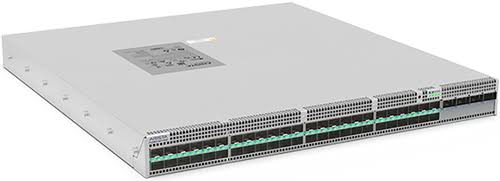
Key Features of Arista 7300 Series
High-Density Ethernet Connectivity
You choose the port layout through the line cards. One option is a 32-port 100GbE card. Another pairs 25GbE server ports with 100GbE uplinks. So you can build the chassis around what your racks actually need, whether that’s more server connections or more uplink bandwidth.
High-Capacity Network Aggregation
Inside the 7300X3, every line card connects to a shared switching fabric. That’s where the 25 Tbps and 50 Tbps figures come from. In practice, it means the switch can collect traffic from many segments at once. It also copes well with east-west traffic, the server-to-server flows that make up most of the load in a modern data center.
Arista EOS Operating System
EOS is the software that runs the 7300 Series. It keeps each protocol process separate from the others, so a problem in one area is less likely to take down the rest. It also supports automation and programmability, which lets your team script routine changes instead of typing them in by hand.
VXLAN and Network Virtualization
VXLAN stretches a Layer 2 segment across an IP network. On supported 7300X3 setups, the switch can bridge and route VXLAN traffic, so virtual workloads and traditional ones can talk to each other. Support varies by hardware and EOS release, so check yours.
High Availability and Redundancy
The chassis supports redundant supervisors, fabric modules, power supplies, and cooling. Many of these parts are hot-swappable, so you can replace them without a full shutdown. A single failed part then has far less impact, as long as the surrounding network is designed for it. Confirm the redundancy setup you need before you order.
Network Monitoring and Automation
Three tools are worth knowing. LANZ catches congestion and microbursts. sFlow shows you what traffic is moving across the network. CloudVision manages the network as a whole and automates repeat tasks. Which of these you can use depends on your software release.
Capabilities of Arista 7300 Series
The 7300X3 handles both Layer 2 switching and Layer 3 routing. Documented capabilities include VLANs, routing protocols, VXLAN bridging and routing, and Multi-Chassis Link Aggregation (MLAG). Teams use these to separate traffic, link network layers, and run virtualized workloads.
It also supports Equal-Cost Multipath Routing (ECMP), which spreads routed traffic over several paths at once. That’s a key piece of any leaf-spine or Spline™ network. Your final design will come down to bandwidth, redundancy goals, hardware, and the EOS features you need.
Key Specifications of Arista 7300 Series
| Specification | Details |
| Platform | Arista 7300X3 |
| Architecture | Modular chassis |
| Switching capacity | Up to 50 Tbps on the 7308X3 |
| Packet forwarding rate | Up to 32 billion packets per second on the 7308X3 |
| Ethernet speeds | 10GbE, 25GbE, 40GbE, 50GbE, and 100GbE, depending on configuration |
| Maximum 100GbE port count | Up to 256 on the 7308X3 |
| Maximum 25GbE port count | Up to 1,024 on the 7308X3 |
| Maximum 10GbE port count | Up to 1,024 on the 7308X3 |
| Operating system | Arista EOS |
| Network capabilities | Layer 2, Layer 3, and supported VXLAN, MLAG, and ECMP features |
| Hardware design | Compatible line cards, supervisors, fabric modules, power supplies, and cooling components |
Common Use Cases
Take a large data center with dozens of server racks. All that traffic has to be collected somewhere, and the links between network layers need to stay fast. The 7300X3 is built for this job. Its modular chassis and dense line cards let you grow the aggregation layer without replacing the whole switch. It’s also a strong fit for leaf-spine or Spline™ designs with heavy east-west traffic.
Cloud providers and companies running virtualized apps need Layer 2 and Layer 3 connectivity that can scale. VXLAN, MLAG, and ECMP cover most of that. The same switches can serve campus cores, high-performance computing clusters, and data-heavy environments, provided the model you pick has enough bandwidth and ports.
Real-World Deployment Scenarios
- Enterprise data center aggregation: Collect connections from server racks and pass traffic up to the next layer.
- Leaf-spine networks: Build a network with several routed paths between switches.
- Cloud infrastructure: Connect compute, storage, and application networks over one fast fabric.
- Virtualized environments: Use VXLAN to link workloads across network segments.
- High-performance computing: Give compute clusters fast Ethernet links.
- Network monitoring: Use LANZ and sFlow to find congestion and track traffic.
Why Choose Netmate IT for Arista 7300 Series?
Netmate IT works with businesses on IT infrastructure and networking. If you’re planning an Arista 7300 Series project, the team can go over port density, switching capacity, uplink needs, and compatibility with you. These details matter because the chassis size, the line cards, and the network design all affect the final setup.
The team can also talk through implementation and support. That may include hardware selection, configuration planning, and connecting the switches to your existing network, depending on the services you agree on. Before deployment, confirm component compatibility, EOS requirements, licensing, and support options.
Ready to plan your network? Contact Netmate IT to discuss your aggregation needs and find the right Arista configuration.
Frequently Asked Questions
1. What is the Arista 7300 Series used for?
It’s a modular switching platform for data centers and enterprise networks. Typical uses include aggregation, leaf-spine, and Spline™ designs.
2. What is the maximum switching capacity of the Arista 7300X3?
The 7304X3 supports up to 25 Tbps, and the 7308X3 supports up to 50 Tbps. What you actually get depends on the chassis and the line cards installed.
3. Does the Arista 7300X3 support 25GbE and 100GbE?
Yes. Compatible line cards support both. The exact port mix depends on the card and its interface modes.
4. What is the difference between the 7304X3 and 7308X3?
The 7304X3 has four line-card slots and up to 25 Tbps. The 7308X3 has eight slots and up to 50 Tbps. Pick based on how many ports you need, how much capacity you need, and how much rack space you have.
5. Can Netmate IT help with Arista 7300 Series deployment?
Netmate IT can talk through your requirements and the support your project needs. Check directly with the team on what they offer for hardware supply, configuration, integration, and ongoing support.
Reviews
There are no reviews yet.