

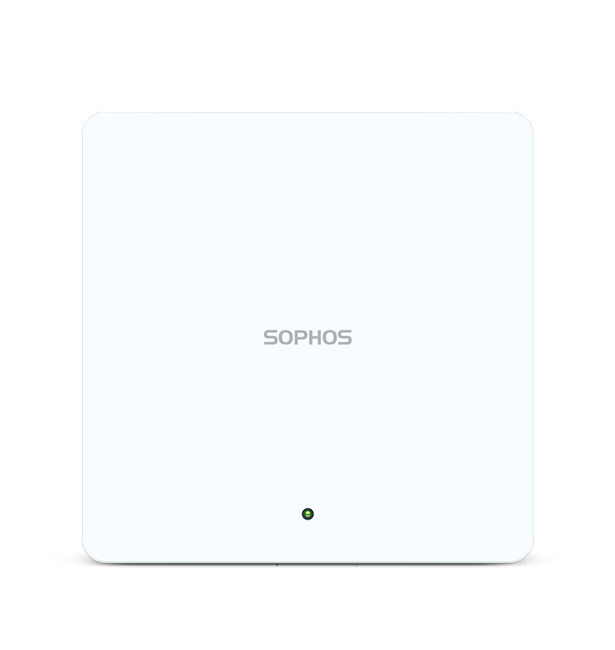
Description
AP6 420 Overview
The Sophos AP6 420 is an indoor Wi-Fi 6 access point built for organizations that need modern wireless performance without the complexity or cost of high-density hardware. Part of the AP6 Series, it focuses on dual-band 2.4/5 GHz operation with cloud management through Sophos Central.
Enterprise Wireless Connectivity
Businesses rely on stable wireless LANs for productivity, collaboration, and IoT devices. The AP6 420 supplies concurrent dual-radio coverage suitable for typical office, retail, and education floors. Its 2×2:2 architecture balances throughput and efficiency for the majority of current client devices.
Wireless Performance and Architecture
IEEE 802.11ax features improve airtime efficiency compared with previous generations. Theoretical aggregate rates reach approximately 2875 Mbps. Internal omnidirectional antennas and DFS support help maximize usable channels indoors. The design prioritizes reliability over peak multi-gigabit client speeds reserved for higher-stream models.
Network Management
All AP6 Series units are managed exclusively from Sophos Central. After physical installation and network connection, the access point discovers the cloud controller automatically. Administrators configure SSIDs, VLANs, security policies, and firmware from one console. A local user interface remains available when only a single access point is deployed. Note that AP6 models cannot be managed from Sophos firewalls.
Security and Access Control
Security settings are applied through Sophos Central, including modern encryption options, guest network isolation, and integration with broader Sophos threat-response capabilities where licensed. VLAN support allows separation of corporate, guest, and device traffic.
Deployment Flexibility
The compact chassis mounts on a desk, wall, or ceiling using the included bracket (compatible with common T-bar sizes). Optional kits cover tile ceilings, plenum spaces, and suspension. Power is supplied via 802.3at PoE+ or the model-specific optional DC adapter.
Performance in Business Environments
In low-to-medium density settings the AP6 420 delivers consistent client experience for everyday productivity applications, web access, and cloud services. It is not positioned for stadium-scale or ultra-dense auditorium use.
Installation and Administration
Physical installation follows standard indoor AP practices: select location for coverage, attach bracket, connect Ethernet/PoE, and onboard via Sophos Central. Ongoing administration consists of policy updates, monitoring, and scheduled firmware releases from the cloud platform.
Why Choose AP6 420?
Organizations already invested in the Sophos ecosystem gain unified visibility and simplified operations. For new deployments the combination of Wi-Fi 6 capability, modest power requirements, included mounting hardware, limited lifetime warranty, and clear positioning for everyday business use makes the AP6 420 a practical choice for many sites.
Configuration Guide
Step 1 — Physical Installation
Select indoor location free of major metal obstructions. Attach the included wall or ceiling bracket. Secure the access point to the bracket.
Step 2 — Connect Ethernet/PoE
Use Cat5 or better cable to a PoE+ (802.3at) switch or injector. Alternatively power the AP6 420 via the optional 12 V DC supply and connect a non-PoE Ethernet cable. Do not use both power sources simultaneously.
Step 3 — Access Management Interface
Create or log into a Sophos Central account. The access point auto-discovers the cloud controller once network connectivity and required ports (443, 80, 123) are available. For a single AP, the local web interface may also be used.
Step 4 — Configure Network Settings
Assign IP addressing (DHCP or static as required by policy). Map management traffic and define VLANs according to site design. All settings are applied from Sophos Central.
Step 5 — Configure Wireless Networks
Create SSIDs, set security/authentication methods, assign passwords or enterprise authentication, map VLANs, and enable guest networks as needed—all via Central.
Step 6 — Configure Radio Settings
Adjust band, channel, channel width, and transmit power within the options exposed by Sophos Central and regional regulations.
Step 7 — Configure Security
Apply encryption, access control, and any synchronized security features available under the customer’s Sophos licenses.
Step 8 — Configure QoS/Roaming
Use available Central features for traffic prioritization and client roaming support. Exact options depend on current firmware and license.
Step 9 — Firmware/Software
Firmware updates are delivered and scheduled through Sophos Central. Avoid interrupting power during updates.
Step 10 — Testing
- Confirm AP appears online in Central
- Test client association and authentication
- Verify coverage with a site survey tool
- Measure throughput on both bands
- Confirm VLAN isolation and guest access
- Check roaming between APs if multiple units are present
- Review logs and alerts
Installation Best Practices
Manufacturer specifications
Indoor only, 0–40 °C operating range, PoE+ 802.3at, included mounting kit for wall/ceiling.
General Wi-Fi deployment practices
Position APs for line-of-sight where possible; avoid large metal or concrete obstructions; plan non-overlapping channels; match client density to the low-to-medium positioning of this model; use quality Cat5e/Cat6 cabling; maintain VLAN and security segmentation; keep firmware current via Central; monitor client and RF metrics regularly. Distinguish manufacturer limits from general best practice.
Benefits for IT Teams
Network administrators gain centralized visibility and policy control. IT managers reduce on-site configuration effort. Security teams benefit from integration potential within the Sophos ecosystem. Business owners obtain a cost-effective upgrade path. System integrators appreciate the straightforward PoE installation and clear model positioning.
Who Should Buy AP6 420?
Small and medium businesses, branch offices, retail locations, smaller education sites, and organizations already using or planning Sophos Central. Suitable for enterprises needing additional low-to-medium density coverage. Not the primary choice for ultra-high-density or outdoor deployments (consider AP6 840/840E or AP6 420X instead).
AP6 420 Product Comparison
| Specification | AP6 420 | AP6 420E | AP6 840 | AP6 840E | AP6 420X Outdoor | Secure Wi-Fi APX Series |
| Product category | Indoor AP | Indoor AP | Indoor AP | Indoor AP | Outdoor IP67 AP | Previous-generation (Wi-Fi 5) series |
| Wi-Fi generation | Wi-Fi 6 | Wi-Fi 6/6E | Wi-Fi 6 | Wi-Fi 6/6E | Wi-Fi 6 | Wi-Fi 5 (802.11ac Wave 2) |
| Frequency bands | 2.4 / 5 GHz | 2.4 / 5 / 6 GHz | 2.4 / 5 GHz | 2.4 / 5 / 6 GHz | 2.4 / 5 GHz | 2.4 / 5 GHz |
| Max theoretical throughput | ~2875 Mbps | ~5375 Mbps | ~3550 Mbps | Higher (tri-radio) | ~2875 Mbps | Lower (Wave 2) |
| Spatial streams | 2×2:2 | 2×2:2 | 4×4:4 | 4×4:4 | 2×2:2 | Varies by model |
| Radio configuration | Dual | Tri | Dual | Tri | Dual | Dual or dual-band |
| Antenna | Internal | Internal | Internal | Internal | External | Internal / external by model |
| Ethernet / uplink | 1 Gbps PoE+ | 2.5 Gbps PoE+ | 2.5 Gbps PoE+ | 2.5 Gbps PoE++ | 2.5 Gbps PoE+ | Varies |
| PoE | 802.3at | 802.3at | 802.3at | 802.3bt | 802.3at | 802.3af/at by model |
| Outdoor/indoor | Indoor | Indoor | Indoor | Indoor | Outdoor | Mostly indoor (320X outdoor) |
| Management | Sophos Central | Sophos Central | Sophos Central | Sophos Central | Sophos Central | Central / firewall (legacy) |
| Recommended deployment | Low–med density | Med density + 6 GHz | Med–high density | High density + 6 GHz | Outdoor | Legacy / existing |
| Key differentiator | Cost-effective Wi-Fi 6 entry | Adds 6 GHz | Higher streams | Highest indoor capacity | Weatherproof | End-of-sale predecessor |
Note: The supplied list contained a duplicate “Secure Wi-Fi APX Series” entry. It has been consolidated into a single column representing the previous APX Series (Wi-Fi 5). APX models are end-of-sale; AP6 is the current generation.
FAQ
What is the Sophos AP6 420?
It is a cloud-managed indoor Wi-Fi 6 (802.11ax) dual-radio access point for low-to-medium density environments such as retail, smaller education, and SMB offices.
What Wi-Fi standard does the AP6 420 support?
IEEE 802.11ax (Wi-Fi 6) plus backward compatibility with earlier standards on 2.4 GHz and 5 GHz bands.
What is the maximum theoretical speed of the AP6 420?
Approximately 2875 Mbps aggregate (575 Mbps on 2.4 GHz + 2300 Mbps on 5 GHz), according to official Sophos specifications.
Does the AP6 420 support Power over Ethernet?
Yes, 802.3at PoE+. An optional 12 V DC power supply is also available for this model.
How is the AP6 420 managed?
Primarily through the Sophos Central cloud platform. A local user interface is available for single-AP deployments. It cannot be managed from Sophos firewalls.
Where can the AP6 420 be installed?
Indoor only—desktop, wall, or ceiling. Mounting bracket for wall and common T-bar ceilings is included.
What is the difference between AP6 420 and AP6 420E?
The 420 is dual-radio Wi-Fi 6 (2.4/5 GHz). The 420E adds a 6 GHz radio (Wi-Fi 6E) and a 2.5 Gbps Ethernet port.
Is the AP6 420 suitable for business Wi-Fi?
Yes, for low-to-medium density business, retail, and education environments as officially positioned by Sophos.
Does the AP6 420 include a mounting kit?
Yes, a bracket for wall and ceiling (15/16″ or 9/16″ T-bar) is included. Optional kits are available.
What warranty does the AP6 420 carry?
Limited Lifetime Warranty, subject to Sophos terms.
Internal Linking Recommendations
| Suggested Anchor Text | Recommended Destination |
| Enterprise Wi-Fi Solutions | Wireless / networking solutions category |
| Wireless Access Points | Access point product category |
| Network Infrastructure | Networking hardware category |
| Business Wi-Fi Solutions | Business wireless solutions page |
| Network Security | Cybersecurity / Sophos security category |
| Sophos Central | Management platform page |
| PoE Switches | Compatible switch product page |

Reviews
There are no reviews yet.