

Description
Arista 720XP Series PoE Campus Switches
The Arista 720XP Series gives modern campus networks fast Ethernet and Power over Ethernet (PoE) in one fixed-configuration switch. It connects computers, wireless access points, IP phones, cameras, and IoT devices. Depending on the model, copper ports run from 10Mbps to 10Gbps, and uplinks go up to 100GbE.
Arista built the 720XP Series for enterprise offices, universities, healthcare facilities, and other connected spaces. The switches handle Layer 2 and Layer 3 networking and run Arista EOS. They also support VLANs, VRFs, and VXLAN/EVPN segmentation. With CloudVision integration and hardware-based telemetry, IT teams can manage configurations, watch traffic, and fix network issues faster.
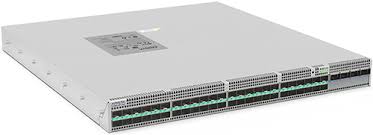
Key Features of the Arista 720XP Series
Power over Ethernet Capabilities
Plenty of devices can get power straight from the network cable, so you don’t need a socket next to every access point, IP phone, or camera. The 720XP Series supports IEEE 802.3af, 802.3at, and 802.3bt, depending on the model. Some configurations push up to 90W per port. Every switch also has a total PoE budget, and that comes from the model and the power supplies inside it. Add up what your devices draw before you pick one.
Multi-Gigabit Ethernet Connectivity
Standard Gigabit ports are starting to feel tight for newer access points and endpoints. Some 720XP models offer 2.5GbE and 5GbE over copper. The 720XP-48TXH-2C-S goes to 10GbE copper. You can match port speed to the device instead of paying for speed you won’t use, and you can upgrade in stages rather than replacing every endpoint in one go. Check your cabling and device speeds first, since they decide which model works.
High-Speed Uplink Connectivity
An access switch is only as fast as its link to the rest of the network. Selected models come with 25GbE SFP28 uplinks and 100GbE QSFP uplinks that connect to your aggregation or core layer. The 720XP-48Y6 and 720XP-24Y6 each have six 25GbE uplinks. Some multi-gigabit models mix 25GbE and 100GbE. How much uplink you need comes down to endpoint speeds, traffic volume, and how the network is laid out.
Arista EOS Operating System
All 720XP switches run Arista EOS. Switching, routing, configuration, and automation sit in one environment, so your team isn’t learning a different system for each job. The software is designed to isolate faults and keep operations steady. EOS has APIs and programmability features for automating routine work. Admins can push configurations, watch network behavior, and track down connection problems with the supported tools. Some features differ by hardware model and EOS release.
CloudVision and Network Monitoring
Arista CloudVision manages the network from one place and shows you what’s going on. Teams use it to monitor infrastructure, handle config changes, and automate supported workflows. The 720XP Series also supports hardware-based FlowTracker, plus IPFIX and sFlow. You can see how traffic moves, review usage, notice patterns, and dig into congestion. What you get in the end depends on your software and management setup.
Network Segmentation and Reliability
VLANs and VRFs keep users, devices, and services apart. Supported VXLAN/EVPN features can carry that separation across bigger designs. So staff, guests, and connected equipment can each get their own traffic policies. Selected configurations also include redundant power supplies, N+1 cooling, persistent PoE during supported reboot events, and priority power assignment. MLAG and ECMP can add resilient paths when set up properly. None of this guarantees uptime, though. Real availability still depends on your hardware, topology, and configuration.
Capabilities of the Arista 720XP Series
The 720XP Series covers Layer 2 switching and Layer 3 routing for campus access networks. VLANs, supported routing protocols, and segmentation features let you connect devices and control traffic between groups. The range of port speeds and PoE options makes it easier to find hardware that suits your access layer.
These switches also work well inside a larger campus design. High-speed uplinks tie them to upstream infrastructure, and supported MLAG and ECMP setups give you redundant paths. EOS handles configuration and automation, and CloudVision supports monitoring and daily operations. As you add users, devices, and bandwidth demand, the network has room to grow.
Key Specifications of the Arista 720XP Series
| Specification | Details |
| Product family | Arista 720XP Series |
| Product type | Fixed-configuration campus PoE switch |
| Copper Ethernet speeds | 10Mbps to 10Gbps, model-dependent |
| PoE standards | IEEE 802.3af, 802.3at, and 802.3bt, model-dependent |
| Maximum per-port PoE | Up to 90W on supported models |
| Uplink connectivity | 25GbE and 100GbE on selected models |
| Switching | Layer 2 and Layer 3 |
| Network segmentation | VLANs, VRFs, VXLAN/EVPN, model and software-dependent |
| Operating system | Arista EOS |
| Network management | CLI and supported CloudVision integrations |
| Traffic monitoring | FlowTracker, IPFIX, and sFlow capabilities |
| Power and cooling | Model-dependent power supplies, N+1 cooling, and airflow options |
| Rack configuration | Model-dependent; verify dimensions for the selected chassis |
Common Use Cases
Think about a typical office. You’ve got computers, IP phones, printers, and wireless access points all needing a port. Now think about a university, where campus Wi-Fi needs multi-gigabit links and student, staff, and guest traffic has to stay apart. The 720XP Series has different port configurations that cover both.
Healthcare facilities can use compatible models to connect cameras, phones, wireless access points, and building systems. Hotels and commercial buildings can run guest Wi-Fi, surveillance, and other PoE-powered equipment on the same switches. If your wireless devices draw a lot of power, look at the models that support up to 90W per port. Whatever the site, the switch has to fit your port speeds, PoE budget, uplink capacity, and network design.
Real-World Deployment Scenarios
In an enterprise office, the 720XP Series can connect employee computers, printers, and IP phones, and it can power compatible devices over PoE. On a university campus, it can link multi-gigabit wireless access points while keeping student, staff, and guest networks separate. Healthcare sites can connect compatible cameras, phones, and wireless devices, with segmentation set up to suit the environment.
Hotels and commercial buildings can use it for wireless access points, surveillance cameras, and other PoE-enabled systems. For multi-building campuses, supported 25GbE or 100GbE uplinks tie the access switches back to the aggregation layer. And if you’re deploying high-power wireless gear, the 720XP-48TXH-2C-S is worth a look for compatible devices that need up to 90W per port.
Why Choose Netmate for Arista 720XP Series?
Netmate IT Solutions provides Arista networking solutions from its office in Bur Dubai, UAE. As an authorized Arista partner, Netmate helps businesses review their campus networking needs and pick the right infrastructure. Its reach covers the UAE and GCC, with extra support in Kenya, Nepal, and Africa.
Choosing a campus switch is about more than counting ports. PoE demand, endpoint speeds, uplink capacity, segmentation, and your existing setup all matter. Netmate can help you work through these and plan the right Arista solution. Depending on the project, the team can also handle deployment, integration, and ongoing maintenance. The aim is simple: get hardware that fits your network now and still works as it grows.
Frequently Asked Questions
1. What is the Arista 720XP Series used for?
The Arista 720XP Series is built for enterprise campus access networking. It connects computers, wireless access points, IP phones, cameras, and other network devices. Each model offers different port speeds, PoE capabilities, and uplink options.
2. Does the Arista 720XP Series support Power over Ethernet?
Yes. Supported models provide PoE through compatible Ethernet ports. Depending on the configuration, the series supports up to 30W, 60W, or 90W per port. The total available power depends on the model and the power supplies installed.
3. What is the difference between the Arista 720XP models?
The models differ in port count, copper Ethernet speeds, PoE capability, and uplink setup. The 24-port and 48-port models suit different access needs, and the 96-port model offers higher port density. Check the official datasheet to compare each model in detail.
4. Does the Arista 720XP Series support 25GbE and 100GbE uplinks?
Yes. Selected models offer 25GbE SFP28 uplinks and 100GbE QSFP uplinks. The number and type of uplink ports depend on the model. Confirm interface and transceiver compatibility before you deploy.
5. Can Netmate help with Arista 720XP deployment?
Yes. Netmate provides Arista networking solutions and can help you review suitable configurations, network architecture, and connectivity needs. You can talk to the team about switch selection, integration, and deployment support based on your current infrastructure and project scope.

Reviews
There are no reviews yet.