

Description
Arista NDR (Network Detection & Response)
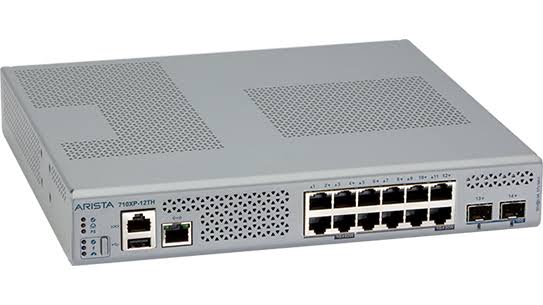
Arista NDR is built around two core software components: the AVA Sensor, which collects and curates network activity data, and the AVA Nucleus, which combines multiple detection models to find malicious behavior inside that data. Sensors can run as software on existing switches, as standalone hardware, as virtual appliances, or as cloud-based sensors, which means the platform’s architecture flexes around a network’s actual layout rather than forcing one fixed deployment shape onto every environment.
Deciding between an all-in-one appliance and a split Sensor and Nucleus deployment, picking the right sensor form factor for each site, and choosing between an on-premises or SaaS Nucleus all shape how well Arista NDR actually fits a network; getting any of those choices wrong usually means redeploying later. Netmate Information Technology Services delivers end-to-end consulting, deployment, and integration support for Arista NDR software, matching sensor and Nucleus architecture to a client’s actual network layout and data residency needs. Based at Al-Riffa Plaza in Bur Dubai, UAE, Netmate serves corporate clients across Saudi Arabia, Qatar, Oman, Kuwait, Kenya, and Nepal.
Key Features of Arista NDR
1. AVA Sensor and AVA Nucleus
The platform splits cleanly into two jobs. The Sensor sits close to network traffic, curating and transferring the relevant deep packet data rather than hauling everything back raw. The Nucleus is where that data actually gets analyzed, running multiple detection models together to separate genuine malicious behavior from normal network noise.
2. Flexible Sensor Form Factors
A Sensor doesn’t have to be a dedicated box sitting in a rack. It can run as embedded software on an existing Arista switch, as standalone hardware, as a virtual appliance, or as a cloud-based sensor, chosen based on what a specific site actually needs. A small branch office and a large data center rarely need the same sensor form factor, and the platform doesn’t force them to.
3. All-in-One or Split Deployment Architecture
For a single site or a team that wants an isolated, self-contained view, the Sensor and Nucleus run together on one appliance. For larger or multi-site environments, they split apart, Sensors distributed across locations feeding data back to a centralized Nucleus. Choosing between the two comes down to how distributed the network actually is, not personal preference.
4. NDR Campus Edition
This is a software extension that runs directly on existing Cognitive Campus switches, deployable through CloudVision or Ansible playbooks rather than requiring new hardware. It still parses more than three thousand protocols, delivered as a switch software upgrade with minimal impact on switch performance, which matters a lot for a campus that can’t afford to swap out hardware just to add detection capability.
5. Full API for SIEM, SOAR, and Ticketing Integration
The AVA Nucleus provides a full API covering extensibility, notifications, and integration with other IT and security tools, including industry-leading SIEM platforms, ticketing systems, and endpoint detection solutions like CrowdStrike. In practice, this lets an analyst pivot straight from a SIEM alert containing just an IP address into a complete profile of that device, without switching tools or rebuilding context from scratch.
6. On-Premises or SaaS Nucleus
The Nucleus can run on-premises or as a SaaS deployment, which matters a great deal for organizations with specific data residency requirements. A business that needs security telemetry to stay within its own infrastructure, rather than a vendor’s cloud, isn’t forced to choose a deployment model that conflicts with internal policy or regulation.
Supported Products/Platforms
| Component | Function |
| AVA Sensor | Collects and curates network activity data |
| AVA Nucleus | Runs detection models and analyzes activity data |
| NDR Campus Edition | Software extension for Cognitive Campus switches |
| Arista CloudVision | Deployment path for sensor software updates |
| EntityIQ | Device, user, and application profiling layer |
| SIEM / SOAR Integration API | Connects NDR alerts into existing security workflows |
Common Use Cases
One possible application for the all-in-one appliance is a petrochemical plant in Ruwais, UAE, where AVA Sensors and AVA Nucleus are installed side by side to provide a single, isolated security perspective of its facility network. In the case of a refinery located in Rabigh, Saudi Arabia, a central Nucleus in the main data center can collect data from all AVA Sensors across multiple sites, and the deployment could be split up. A port authority in Khasab, Oman, may consider an on-premises Nucleus in order to retain security data within their own infrastructure, to satisfy internal data residency requirements.
The school district in Malaba, Kenya could implement NDR Campus Edition, an extension of detection within the existing Cognitive Campus switches by simply upgrading the software. A bank in Ilam, Nepal could connect to Arista NDR and allow analysts to go from an alert that includes only an IP address directly to a complete EntityIQ profile.
Real World Deployment Scenarios
- The all-in-one appliance is installed in a petrochemical plant in Ruwais where it is used in conjunction with AVA Sensor and AVA Nucleus to provide a unified security perspective of the plant network.
- A refinery with multiple sites has its AVA Sensors deployed at various locations with a central AVA Nucleus in its main data center that collects and processes data from all of the others.
- A Khasab port authority selects an on-premises Nucleus to ensure that security data stays on the enterprise’s infrastructure and not in a SaaS solution, in compliance with internal data residency requirements.
- A School District in Malaba adopts NDR Campus Edition, with NDR detection rolled out to the existing Cognitive Campus switches, with a simple software upgrade.
- A bank in Ilam integrates Arista NDR into their existing SIEM, allowing analysts to click directly from an alert with only an IP address into a complete EntityIQ profile.
- A UAE-based company chooses Managed NDR with Awake Labs, instead of employing and training all the necessary security operations personnel from scratch.
Why Choose Netmate for Arista NDR
Netmate’s certified network engineers and presales consultants (20+ each) manage the placement of sensors, deployment of Nucleus, and integration with the client’s SIEM or ticketing system to ensure the platform integrates into the client’s security workflow on day one. If the placement of the sensors is incorrect, if sensors cover the wrong segments, or if a critical sensor is not placed, then there are blind spots, and these will not be apparent until after the sensors have been deployed and something goes wrong.
From deployment across switches, to establishing a split architecture with multiple sites, to the ability to extend NDR Campus Edition onto existing Arista switches, or to the ability to connect NDR alerts to your SIEM or SOAR platform, Netmate lets your team maximize the value of your investment in Arista switches.
Contact :https://netmateit.com/contact-us-netmate-it-solutions/
Frequently Asked Questions
1. What’s the actual difference between the AVA Sensor and the AVA Nucleus?
The Sensor will be the piece of equipment located close to actual network traffic where the activity data of interest is gathered and curated from switches, servers, or other monitored points. That curated data is where the Nucleus analysis actually happens, passing it through several models to determine if it’s really malicious. They both work together to function; one is called on to collect, and the other is used to analyze.
2. Should we choose an all-in-one appliance or a split deployment?
Running Sensor and Nucleus together in one appliance represents a single location or a team that requires a simple, contained, isolated display of their surroundings. This is the Split deployment, where Sensors are spread out and deployed in various locations and feed a centralized Nucleus. The decision of which is correct is contingent primarily on the extent of the network, not simply size.
3. What’s NDR Campus Edition, and how is it different from standard Arista NDR?
NDR Campus Edition is designed to be deployed directly on the current Cognitive Campus switch instead of requiring any additional sensor hardware, through CloudVision or Ansible. It will still translate thousands of protocols in the same manner as the standard Arista NDR; however, it’s largely lightweight and campus native, which makes it appropriate for organizations that already deploy Cognitive Campus infrastructure.
4. Can we choose where our data gets stored, on-premises or in the cloud?
Yes. The AVA Nucleus can be deployed on-premises or as a SaaS – a big differentiating factor for organizations with specific data residency or regulatory needs around where security telemetry actually resides. Before deploying, it is important to confirm which model meets the policy requirements of a particular organization, and not after deployment.
5. How does Arista NDR actually integrate with our existing SIEM?
The AVA Nucleus includes a complete API for integration with industry-leading SIEM products, enabling the seamless transfer of detection data to the security teams’ existing tools. This translates to a SIEM analyst hitting an alert with an IP or email address and immediately going straight to the in-depth view of the corresponding EntityIQ profile in Arista NDR without having to switch context between unrelated tools.
6. What sensor form factor fits our environment best?
It depends on the specific site. A location with existing, compatible Arista switches might run sensor software directly on them. A site without that infrastructure might need a standalone hardware or virtual sensor instead. A cloud workload might call for a cloud-based sensor entirely. Matching form factor to actual infrastructure, rather than defaulting to one option everywhere, is exactly the kind of planning that happens during deployment scoping.
7. Is there a managed option if we don’t have an in-house security team?
Yes, through Managed NDR, which pairs the Arista NDR platform with security experts from Awake Labs who bring decades of threat hunting and incident response experience to a customer’s 24×7 security operations. This fits organizations that want the detection capability without building and staffing a dedicated security operations team from scratch.


Reviews
There are no reviews yet.