

Description
RM-SR-T10 Rackmount 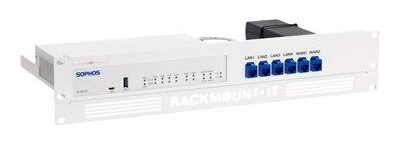
The RM-SR-T10 from Rackmount.IT is a dedicated rackmount solution for Sophos SD-RED 20 and RED 60 appliances. It transforms desktop-style devices into neatly integrated 19-inch rack components.
Design and Usability
Network ports and the console are extended to the front panel using the included short cables and RJ45 couplers. This simplifies cable management and day-to-day access. The power supply is mechanically fixed to avoid accidental unplugging.
Installation
Assembly is straightforward: slide the Sophos device into the kit, secure retainers, connect the supplied cables to the keystones, and fix the power supply. The process typically takes about five minutes.
What’s Included
SoRack chassis with pre-positioned RJ45 couplers, Rackmount.IT front plate, six 0.5 m cables, assembly materials, and an installation guide.
Why Choose RM-SR-T10?
A clean, reliable, and purpose-built way to rack-mount Sophos RED 20 and 60 devices while improving accessibility and operational stability.
Installation Guide
Step 1 – Unpack and Verify
Confirm all components: SoRack, front plate, cables, couplers, and hardware.
Step 2 – Prepare the Rack
Identify a suitable 1.3U–2U space in a standard 19-inch rack.
Step 3 – Install the Chassis
Mount the SoRack into the rack using the supplied hardware.
Step 4 – Insert the Sophos Device
Slide the SD-RED 20 or RED 60 into the kit and secure with retainers.
Step 5 – Connect Front Cables
Attach the supplied short cables between the device ports and the front keystones/couplers.
Step 6 – Secure the Power Supply
Fix the power adapter in place according to the installation guide.
Step 7 – Cable Management
Route remaining cables neatly and label ports as needed.
Step 8 – Power On and Test
Apply power, verify device operation, and confirm front-port connectivity.
Mounting Options
19-Inch Rack
Designed exclusively for standard 19-inch equipment racks. Occupies 1.3U (or 2U visual height with the front plate).
No desktop or wall-mount configuration is intended; this is a pure rackmount accessory.
Installation Best Practices
Manufacturer Guidelines
Follow the included installation guide. Ensure the Sophos device is fully seated and retainers are properly engaged. Secure the power supply as instructed.
General Best Practices
Maintain adequate airflow around the kit. Use the supplied cables for front connections. Label front ports clearly. Avoid overloading adjacent rack space. Verify compatibility only with Sophos SD-RED 20 and RED 60.
Benefits for IT Teams
Professional appearance and organization in the rack. Front access speeds troubleshooting and cabling changes. Fixed power supply improves uptime. Rapid assembly minimizes deployment time. Consistent mounting standard for RED devices.
Main Features
Custom Fit for Sophos RED 20/60
Purpose-built chassis for exact model compatibility.
Benefit: Secure, stable mounting without modification.
Front-Facing Network Connections
Ports and console brought to the front via cables and couplers.
Benefit: Easy access for cabling, troubleshooting, and maintenance.
Fixed Power Supply
Power adapter is secured to the kit.
Benefit: Reduced risk of accidental power loss.
Quick Assembly
Designed for approximately 5-minute installation.
Benefit: Minimal downtime and simple deployment.
Complete Kit
Includes cables, RJ45 couplers, front plate, and assembly hardware.
Benefit: Everything needed in one package.
Clean Rack Integration
Professional 19-inch appearance in signal white.
Benefit: Organized, reliable installation in any standard rack.
Product Deployment Scenarios
1. Branch Office Racks
Mount Sophos RED devices cleanly in small branch network closets.
2. Data Center or Server Room
Integrate desktop-form RED appliances into standard 19-inch racks.
3. Managed Service Provider Environments
Standardize mounting of customer RED devices for consistent serviceability.
4. Network Closet Upgrades
Convert desktop RED units to rack-mounted form for better organization.
5. High-Reliability Installations
Use the fixed power supply design where accidental disconnection is a concern.
6. Sophos SD-WAN / RED Deployments
Complement Sophos SD-RED 20 or 60 installations with professional rack mounting.
Who Should Buy RM-SR-T10?
Organizations deploying or already using Sophos SD-RED 20 or RED 60 that need to place these devices in a standard 19-inch rack. Ideal for branch offices, MSPs, and any environment where desktop appliances must be rack-mounted cleanly and reliably.
Product Notes
The RM-SR-T10 is a specialized accessory for Sophos RED 20/60. Other Rackmount.IT kits exist for different Sophos firewall models (for example XGS series). Always confirm the exact model compatibility before ordering.
Frequently Asked Questions
What is the RM-SR-T10?
A 19-inch rackmount kit designed specifically for Sophos SD-RED 20 and Sophos RED 60 appliances.
Which Sophos models are supported?
Sophos SD-RED 20 and Sophos RED 60.
How much rack space does it use?
1.3U (or 2U visual height when the supplied front plate is used).
Are network ports accessible from the front?
Yes. Connections and the console port are brought to the front using the included cables and RJ45 couplers.
Is the power supply secured?
Yes. The kit includes fixation for the power supply to prevent accidental disconnection.
How long does assembly take?
Approximately 5 minutes.
What is included in the box?
SoRack with RJ45 couplers, front plate, 6 × 0.5 m cables, assembly materials, and installation guide.
What color is the kit?
RAL 9003 Signal White as standard. Other colors may be available on a project basis.
Who manufactures the RM-SR-T10?
Rackmount.IT.
Can it be used with other Sophos firewalls?
No. It is designed specifically for the RED 20 and RED 60 models. Other kits exist for different Sophos appliances.
Reviews
There are no reviews yet.