

Description
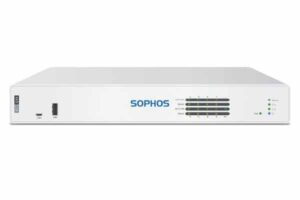
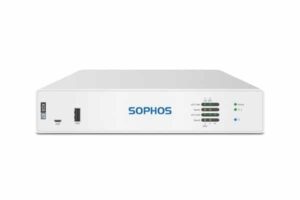
Sophos XGS 126

The Sophos XGS 126 is a next-generation firewall appliance designed to protect business networks while providing flexible wired, fiber, VPN, and expansion connectivity. It belongs to the Sophos XGS desktop firewall family and is designed for SMB and branch-office deployments.
With up to 10.5 Gbps firewall throughput, 5.5 Gbps IPsec VPN throughput, and 3.25 Gbps IPS throughput, the XGS 126 provides security performance for networks that require more capacity than entry-level firewall appliances.
Connectivity
The XGS 126 includes 10 Gigabit Ethernet copper ports and two SFP fiber ports. Two Gigabit Ethernet interfaces also support 802.3at PoE with up to 30W per port. This combination allows the appliance to serve as both a security gateway and a flexible network connectivity point.
The SFP interfaces can be paired with compatible transceivers for fiber connectivity. Sophos states that transceivers are sold separately.
Expansion
One expansion slot allows the XGS 126 to be adapted for additional connectivity requirements. Sophos lists optional SFP DSL, 3G/4G, and Gen.1 5G connectivity options for the platform.
Deployment
The XGS 126 has a compact 320 x 44 x 213 mm chassis and weighs approximately 2.4 kg unpacked. A rackmount kit is available separately, allowing the desktop appliance to be integrated into rack-based installations.
For the accessory ecosystem, the provided Sophos Accessories reference identifies RM-SR-T12 as the rackmount Series for XGS 116, XGS 126, and XGS 136.
Selection Guide
For Business Firewall Deployment
Choose the Sophos XGS 126 when the network requires a desktop firewall with high firewall throughput, multiple Gigabit Ethernet interfaces, SFP connectivity, VPN capabilities, and expansion options.
For Fiber Connectivity
Use the two SFP interfaces with compatible Sophos SFP transceivers according to the required fiber type, speed, and deployment distance.
For PoE Devices
Use the two integrated PoE-capable Gigabit Ethernet interfaces when compatible devices need network connectivity and power.
For Cellular Backup
Check compatibility and regional availability before selecting an optional 3G/4G or 5G module for cellular WAN connectivity.
For Rack Installation
Use the model-specific RM-SR-T12 rackmount solution identified for the XGS 126 in the supplied Sophos Accessories reference.
Always Verify
Confirm the exact appliance model, hardware revision, accessory compatibility, transceiver requirements, licensing, and regional availability before purchasing.
Installation Notes
Place the Sophos XGS 126 in a suitable location with adequate airflow and connect the required Ethernet, SFP, management, and power interfaces.
For SFP connectivity, install the appropriate compatible transceiver and use the corresponding fiber or copper connection. Sophos specifies that SFP transceivers are sold separately.
If PoE is required, connect supported devices to the designated PoE-capable interfaces and ensure the power requirements remain within the stated limits.
When installing the XGS 126 in a rack, use the appropriate model-specific rackmount solution rather than a generic shelf. The supplied reference identifies RM-SR-T12 for the XGS 126.
Follow Sophos installation documentation for hardware installation, power connections, network configuration, and optional module installation.
Best Practices
- Use compatible Sophos transceivers for production fiber links.
- Confirm the exact accessory and hardware compatibility before installation.
- Maintain adequate airflow around the appliance.
- Label network interfaces and document connected devices.
- Use the model-specific rackmount solution for rack installations.
- Keep appropriate spare transceivers for critical fiber connections.
- Verify regional availability of cellular modules before procurement.
- Follow Sophos documentation when installing expansion modules.
- Plan PoE usage according to the maximum supported output.
- Keep firewall firmware updated according to your organization’s maintenance policy.
Benefits for IT Teams
The Sophos XGS 126 provides a centralized platform for network security, firewall policy enforcement, VPN connectivity, traffic inspection, and network segmentation.
Its combination of Gigabit Ethernet and SFP interfaces simplifies connectivity planning, while the expansion bay provides additional deployment flexibility. Optional rackmount hardware can also help standardize physical installations across branch and office environments.
For IT teams, the platform can support standardized firewall deployments while providing multiple connectivity options within a compact desktop form factor.
Main Benefits
High-Speed Network Security
The XGS 126 delivers up to 10.5 Gbps firewall throughput.
Benefit: Handle substantial network traffic while maintaining centralized security controls.
Flexible Port Connectivity
The firewall includes 10 Gigabit Ethernet copper interfaces and two SFP fiber ports.
Benefit: Connect copper-based devices while supporting fiber uplinks where required.
Integrated PoE
Two Gigabit Ethernet ports support 802.3at PoE with up to 30W per port.
Benefit: Power compatible network devices directly through supported Ethernet interfaces.
Advanced Security Inspection
The XGS 126 supports IPS, NGFW, threat protection, and SSL/TLS inspection.
Benefit: Apply multiple layers of network security from a single firewall platform.
Connectivity Expansion
The integrated expansion bay supports optional modules, including cellular connectivity options.
Benefit: Adapt the firewall to branch offices and locations requiring alternative WAN connectivity.
Flexible Deployment
The XGS 126 can operate as a desktop appliance or be installed with a compatible rackmount solution.
Benefit: Adapt the physical installation to office, branch, or rack-based network environments.
Typical Use Cases
1. Small and Medium Business Networks
Deploy the XGS 126 as the central security gateway for business networks requiring firewall protection, VPN connectivity, and traffic inspection.
2. Branch Office Security
Use the appliance to provide centralized security and WAN connectivity at branch locations.
3. Fiber Uplinks
Use the two SFP interfaces with compatible transceivers for fiber connectivity. Sophos notes that SFP transceivers are sold separately.
4. PoE Network Deployments
Use the two integrated PoE interfaces to connect and power compatible network devices.
5. Remote Connectivity
Use optional cellular modules where supported to provide alternative or backup WAN connectivity.
6. Rack-Based Deployments
Install the desktop firewall into a standard rack using a compatible rackmount solution. The Sophos Accessories reference identifies RM-SR-T12 for XGS 116, XGS 126, and XGS 136.
Who Should Buy Sophos XGS 126?
The Sophos XGS 126 is designed for organizations that need a high-performance desktop next-generation firewall for business or branch-office networks.
It can be considered by:
- Small and medium-sized businesses
- Branch offices
- Distributed organizations
- Businesses requiring fiber uplinks
- Organizations using PoE network devices
- IT teams requiring VPN connectivity
- Businesses requiring optional cellular WAN connectivity
- Organizations moving desktop firewall appliances into rack environments
The XGS 126 is particularly relevant where a business requires multiple Gigabit Ethernet interfaces, SFP connectivity, PoE, and additional expansion options in one firewall appliance.
Related Products and Accessories
Explore related Sophos solutions for complete network deployment:
- Sophos XGS 116
- Sophos XGS 116w
- Sophos XGS 126w
- Sophos XGS 136
- Sophos XGS 136w
- Sophos Rackmounts
- Sophos SFP Transceivers
- Sophos 3G/4G Modules
- Sophos 5G Modules
- Sophos Firewall Accessories
- RM-SR-T12 Rackmount Series
The supplied accessories reference specifically groups XGS 116, XGS 126, and XGS 136 under the RM-SR-T12 rackmount Series.
Frequently Asked Questions
What is the Sophos XGS 126?
The Sophos XGS 126 is a desktop next-generation firewall designed for SMB and branch-office networks. It provides firewall security, IPS, VPN, SSL/TLS inspection, threat protection, and flexible network connectivity.
How much firewall throughput does Sophos XGS 126 provide?
Sophos publishes up to 10.5 Gbps firewall throughput for the XGS 126. Its published IPS throughput is 3.25 Gbps and IPsec VPN throughput is 5.5 Gbps.
How many ports does the Sophos XGS 126 have?
The XGS 126 provides 10 Gigabit Ethernet copper ports and 2 SFP fiber ports. Two of the Gigabit Ethernet ports support PoE.
Does Sophos XGS 126 support PoE?
Yes. Two Gigabit Ethernet interfaces support 802.3at PoE, with up to 30W per port.
Does Sophos XGS 126 support SFP?
Yes. The XGS 126 includes two SFP fiber interfaces. Compatible SFP transceivers are sold separately.
Can Sophos XGS 126 use a 5G module?
The XGS 126 has one expansion bay and Sophos lists an optional Gen.1 5G module for the model. Availability and compatibility should be verified for the intended region and hardware configuration.
Can Sophos XGS 126 be rack mounted?
Yes. Sophos lists a rackmount kit as available separately. The supplied Sophos Accessories reference identifies RM-SR-T12 for XGS 116, XGS 126, and XGS 136.
Does Sophos XGS 126 support redundant power?
Yes. Sophos lists an optional second redundant power supply for the XGS 126 platform.
How many concurrent connections does XGS 126 support?
The XGS 126 supports up to 5,000,000 concurrent connections according to Sophos technical specifications.
Who should use Sophos XGS 126?
The XGS 126 is intended for SMB and branch-office environments that need a high-performance firewall with multiple Gigabit Ethernet ports, SFP connectivity, PoE, VPN, security inspection, and expansion options.

Reviews
There are no reviews yet.