

Description
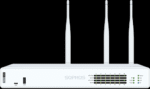
Sophos XGS 136

The Sophos XGS 136 is a first-generation XGS desktop firewall designed for SMB and branch office environments that require a combination of security performance, flexible connectivity, and modular expansion.
The appliance delivers up to 11.5 Gbps firewall throughput, 4 Gbps IPS throughput, 6.35 Gbps IPsec VPN throughput, and 3 Gbps NGFW throughput under Sophos’ published test methodology.
The XGS 136 uses an x86 CPU together with Sophos’ Xstream Flow processor for hardware-level acceleration of supported traffic.
Connectivity Category
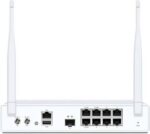
The XGS 136 provides 10 × Gigabit Ethernet copper ports, 2 × 2.5 Gigabit Ethernet PoE ports, and 2 × SFP fiber ports.
The two 2.5 GE ports support 802.3at PoE with a maximum of 30W per port. The SFP interfaces support compatible SFP transceivers, which are sold separately.
Expansion Category
One expansion slot allows the XGS 136 to support optional connectivity modules.
Supported options include 3G/4G and 5G modules. Sophos also documents an SFP VDSL2 modem as an optional connectivity option for XGS models with an SFP port.
The 5G module supports Sub-6 5G connectivity and automatic fallback to 3G and 4G LTE. Sophos states that supported XGS 116, 126, and 136 models can use the module for cellular connectivity, including supported SD-WAN and backup scenarios.
Rackmount Category
The XGS 136 can be installed in a rack using an optional rackmount kit.
Sophos lists a rackmount kit as available separately, allowing the desktop appliance to be incorporated into a rack-based network installation.
Why Choose Sophos XGS 136?
The XGS 136 brings together high firewall throughput, 2.5 GE PoE connectivity, SFP fiber interfaces, modular cellular connectivity, and optional power redundancy in a compact desktop appliance.
It can therefore be configured according to the connectivity and deployment requirements of SMB, branch office, and distributed network environments.
Selection Guide
For Firewall Deployment
Evaluate the required firewall, IPS, VPN, and TLS inspection performance before selecting the XGS 136.
The published XGS 136 figures are measured under Sophos’ specific test conditions, so actual throughput depends on network traffic and enabled security services.
For PoE Connectivity
Use the two integrated 2.5 GE PoE ports for compatible devices requiring network connectivity and power.
Each port supports up to 30W under 802.3at.
For Fiber Links
The XGS 136 includes two SFP fiber interfaces.
Select compatible SFP transceivers according to the required fiber type, distance, and network configuration. Sophos notes that transceivers are sold separately.
For Cellular Connectivity
Use the expansion bay for supported 3G/4G or 5G connectivity modules.
The Sophos 5G module supports XGS 136 and can provide cellular connectivity for supported deployments.
For Rack Installation
Select the compatible rackmount kit when installing the XGS 136 in a standard rack environment.
Sophos lists the rackmount kit as an optional accessory.
Always Verify
Confirm the exact appliance model, hardware revision, Sophos Firewall OS requirements, module compatibility, regional availability, and transceiver requirements before purchasing.
Installation Notes
The Sophos XGS 136 is a desktop appliance and can be deployed on a suitable surface or installed into a rack using the compatible rackmount kit.
SFP transceivers should be selected according to the required network medium and installed into the SFP interfaces according to the manufacturer’s hardware guidance.
Optional connectivity modules such as 3G/4G and 5G modules should be installed according to the relevant Sophos hardware documentation. Sophos states that the 5G module is integrated into the appliance and managed through the Sophos Firewall console.
For PoE deployment, verify that the connected device complies with the supported 802.3at requirements and remains within the 30W maximum per port.
Best Practices
Use the correct Sophos accessories and modules for the XGS 136.
Select SFP transceivers according to the required fiber medium and link distance. Verify compatibility before purchasing third-party optics or accessories.
Maintain adequate airflow around the appliance and avoid blocking ventilation.
When using PoE, check the power requirements of connected devices before deployment.
For critical environments, consider the optional second power supply for power redundancy.
Keep documentation of installed modules, SFP transceivers, and network connections for easier maintenance and troubleshooting.
Benefits for IT Teams
The Sophos XGS 136 provides a combination of high firewall performance and flexible physical connectivity in a desktop appliance.
Its 2.5 GE PoE ports, SFP interfaces, expansion bay, and optional redundant power allow IT teams to configure the appliance according to deployment requirements.
Optional rackmount support also provides a path for integrating the desktop firewall into a standard rack environment.
Main Benefits
High-Speed Security
The XGS 136 provides up to 11.5 Gbps firewall throughput and 4 Gbps IPS throughput.
Benefit: Handle demanding network traffic while applying security inspection.
Flexible Connectivity
The appliance combines Gigabit Ethernet, 2.5 Gigabit Ethernet, SFP fiber, and PoE interfaces.
Benefit: Connect different network devices and media without relying on a single interface type.
PoE Support
Two 2.5 GE ports provide IEEE 802.3at PoE with up to 30W per port.
Benefit: Supply network connectivity and power to compatible devices through supported PoE ports.
Expandable WAN Connectivity
The expansion bay supports optional 3G/4G and 5G connectivity modules.
Benefit: Add cellular connectivity for supported remote, backup, and SD-WAN deployments.
Power Redundancy
The XGS 136 supports an optional second power supply.
Benefit: Add a redundant power option for deployments where power resilience is required.
Rack Deployment Flexibility
An optional rackmount kit is available for the desktop appliance.
Benefit: Integrate the XGS 136 into standard rack environments while retaining its desktop appliance architecture.
Typical Use Cases
1. SMB Network Security
Deploy the Sophos XGS 136 as the primary firewall for businesses that need advanced network protection and multiple connectivity options.
2. Branch Office Security
The XGS 136 is suited to branch environments requiring firewall security, VPN connectivity, and flexible WAN options.
3. PoE Network Deployment
Use the integrated 2.5 GE PoE ports to connect compatible powered network equipment.
4. Fiber Connectivity
Use the two SFP interfaces for supported fiber network connections and appropriate SFP transceivers.
5. Cellular Backup Connectivity
Install a supported 3G/4G or 5G module through the expansion bay where cellular connectivity is required. Sophos specifically supports the 5G module on the XGS 136 and other XGS 116/126/136 models.
6. Rack-Based Deployment
Use the optional rackmount kit to integrate the XGS 136 into a professional 19-inch rack installation.
Who Should Buy Sophos XGS 136?
The Sophos XGS 136 is intended for organizations looking for a high-performance Sophos Firewall appliance for SMB, branch office, and distributed network deployments.
It is particularly relevant for organizations that need:
- Advanced firewall and threat protection
- Multiple Gigabit Ethernet connections
- 2.5 GE PoE connectivity
- SFP fiber connectivity
- Optional 3G/4G or 5G connectivity
- Optional redundant power
- Rack installation capability
Sophos positions the first-generation XGS desktop range for SMB and branch office environments. The manufacturer currently notes that these first-generation models are available as long as stock lasts.
Related Categories
Explore related products and accessories for the Sophos XGS 136:
- Sophos Firewalls
- Sophos XGS Series
- Sophos Rackmounts
- Sophos Modules & Transceivers
- Sophos 5G Modules
- Sophos SFP Transceivers
- Sophos Power Supplies
- Sophos Firewall Accessories
Frequently Asked Questions
What is the Sophos XGS 136?
The Sophos XGS 136 is a first-generation XGS desktop next-generation firewall designed for SMB and branch office deployments. It provides 11.5 Gbps firewall throughput, 4 Gbps IPS throughput, 6.35 Gbps IPsec VPN throughput, and 3 Gbps NGFW throughput under Sophos’ published test conditions.
How many ports does the Sophos XGS 136 have?
The XGS 136 provides 10 × Gigabit Ethernet copper ports, 2 × 2.5 Gigabit Ethernet PoE ports, and 2 × SFP fiber ports.
Does the Sophos XGS 136 support PoE?
Yes. The XGS 136 has two 2.5 GE PoE ports supporting IEEE 802.3at with a maximum of 30W per port.
Does Sophos XGS 136 support 5G?
Yes. The XGS 136 has an expansion bay that supports the Sophos 5G module. Sophos states that the module supports Sub-6 5G and automatic fallback to 3G and 4G LTE.
Does the XGS 136 support 3G/4G?
Yes. Sophos lists optional 3G/4G connectivity for the XGS 136 through its expansion bay.
Does Sophos XGS 136 have Wi-Fi?
The standard XGS 136 does not have built-in Wi-Fi. The related XGS 136w model includes Wi-Fi 5, while the XGS 136 itself is the non-Wi-Fi version.
Can Sophos XGS 136 be rack mounted?
Yes. Sophos lists an optional rackmount kit for the XGS 136.
Does Sophos XGS 136 support a redundant power supply?
Yes. An optional second power supply is available for the XGS 136.
Does Sophos XGS 136 support SFP?
Yes. The XGS 136 includes two SFP fiber interfaces. Compatible SFP transceivers are sold separately.
Is Sophos XGS 136 a current-generation firewall?
The XGS 136 belongs to Sophos’ first-generation XGS desktop models. Sophos currently states that these first-generation models are available as long as stock lasts.
Reviews
There are no reviews yet.