

Description
Sophos XGS 138
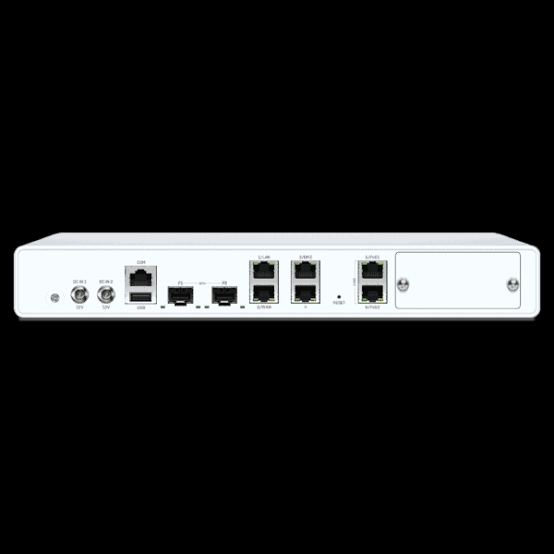
The Sophos XGS 138 is a high-performance desktop next-generation firewall for SMB, branch-office, and distributed-edge networks that require advanced security and high-speed connectivity in a compact platform.
It delivers up to 19.1 Gbps firewall throughput, 5.85 Gbps IPS throughput, 5.1 Gbps NGFW throughput, and 4.75 Gbps threat protection throughput under Sophos’ published testing conditions. It also supports up to 6.6 Gbps IPsec VPN throughput for secure site-to-site and remote connectivity.
Connectivity
The XGS 138 combines 4 × Gigabit Ethernet copper ports, 2 × 2.5GbE PoE ports, and 2 × 10GbE SFP+ interfaces.
The SFP+ ports provide high-speed fiber connectivity for uplinks and aggregation, while the 2.5GbE PoE ports can supply up to 30W per port to compatible powered devices.
5G Expansion
One expansion bay is available for the optional Gen.2 5G module.
The module provides an additional cellular connectivity option that can be used for WAN redundancy, backup connectivity, SD-WAN applications, or 5G fixed wireless access.
Rackmount Deployment
The XGS 138 is a desktop appliance, but it can be integrated into a standard rack using the dedicated optional rackmount kit.
Sophos’ rackmount instructions specifically identify the kit as compatible with the XGS 118, XGS 128, and XGS 138 models. The kit can be configured with the appliance facing either front or rear depending on the installation requirement.
Power and Resilience
The XGS 138 uses an external power supply and supports an optional second redundant power supply.
For environments where firewall uptime is important, redundant power can provide an additional level of resilience against power-supply failure.
Why Choose the Sophos XGS 138?
The XGS 138 combines high-speed firewall processing, 10G fiber connectivity, multi-gigabit PoE, optional 5G, rackmount capability, and redundant power options in a desktop form factor.
It is particularly well suited to organizations that need more connectivity and processing capability than smaller desktop firewalls while still preferring a compact appliance rather than a larger 1U or 2U rackmount platform.
Selection Guide
For High-Speed Fiber Uplinks
Choose compatible SFP+ transceivers when connecting the XGS 138 to 10G fiber infrastructure.
Confirm the fiber type, transmission distance, connector requirements, and transceiver compatibility before purchasing.
For 2.5GbE PoE Devices
Use the two integrated 2.5GbE PoE interfaces when compatible devices require both higher-speed Ethernet and PoE.
Check the connected device’s PoE standard and power requirements.
For 5G Connectivity
Select the Sophos Gen.2 5G module when cellular WAN connectivity is required.
It is suitable for redundancy, backup WAN, SD-WAN-related connectivity, or 5G fixed wireless access applications.
For Rack Installation
Use the dedicated rackmount kit designed for the XGS 118, XGS 128, and XGS 138 family.
Avoid assuming that a rackmount kit designed for another XGS model is interchangeable.
For Power Redundancy
Consider the optional second power supply where firewall availability and power resilience are important.
Always Verify
Cross-check the current Sophos product documentation, compatibility information, regional availability, and the exact hardware revision before purchasing accessories or expansion modules.
Installation Notes
The XGS 138 can be deployed on a stable horizontal surface or installed in a rack using the optional rackmount kit.
For rack installation, use the dedicated mounting hardware and follow Sophos’ installation instructions. The rackmount kit is specifically designed for the XGS 118, XGS 128, and XGS 138 models.
For SFP/SFP+ connectivity, insert the compatible transceiver into the appropriate cage and connect the correct fiber or copper medium according to the transceiver specification.
For the optional 5G module, installation should follow the official Sophos hardware documentation. The module is designed to be securely installed inside the XGS appliance and managed through Sophos Firewall.
For redundant power, install the supported second power supply according to the hardware guide and connect the power sources appropriately.
Best Practices
- Use Sophos-listed or compatible SFP/SFP+ transceivers for production connectivity.
- Confirm the optical module’s speed, fiber type, and transmission distance before installation.
- Use the dedicated rackmount kit rather than an improvised shelf for rack deployment.
- Maintain adequate airflow around the appliance and inside the rack.
- Use the 2.5GbE PoE ports only with compatible devices and within their specified power limits.
- Consider the optional second power supply for critical installations.
- Use the Gen.2 5G module where cellular WAN redundancy or 5G access is required.
- Document transceiver types, fiber paths, WAN connections, and accessory installations.
- Keep spare compatible transceivers and critical accessories for important network links.
- Verify current Sophos compatibility documentation before purchasing replacement or expansion components.
Benefits for IT Teams
The Sophos XGS 138 gives IT teams a compact security platform with high-speed Ethernet, 10G SFP+ connectivity, PoE, optional 5G, and rackmount flexibility.
Its accessory and expansion options simplify deployment planning while allowing the firewall to adapt to different network architectures.
Key operational benefits include:
- High-speed security processing
- 10G fiber connectivity
- Multi-gigabit PoE support
- Optional 5G WAN connectivity
- Dedicated rackmount installation
- Optional redundant power
- Flexible deployment for branch and SMB environments
- Reduced need for separate connectivity equipment in selected deployments
Main Benefits
High-Speed Security
The XGS 138 provides up to 19.1 Gbps firewall throughput.
Benefit: Handle demanding network traffic while maintaining firewall and security inspection capabilities.
10G Network Uplinks
Two built-in SFP+ interfaces support high-speed fiber connectivity.
Benefit: Connect the firewall to 10G switching, aggregation, or server infrastructure.
Multi-Gigabit PoE
Two 2.5GbE PoE ports provide both data and power.
Benefit: Simplify connectivity for compatible powered network devices.
Flexible WAN Options
The optional Gen.2 5G module provides an additional cellular connectivity option.
Benefit: Add WAN redundancy or deploy 5G as a primary or secondary connectivity path where appropriate.
Rack-Ready Deployment
A dedicated rackmount kit is available for the XGS 138.
Benefit: Integrate the desktop appliance into a standard rack environment without relying on a generic shelf.
Power Redundancy
An optional second power supply is supported.
Benefit: Improve resilience in environments where maintaining firewall availability is important.
Typical Use Cases
1. SMB Network Security
Deploy the XGS 138 as the primary security gateway for a growing business network.
Its combination of high firewall performance, 10G connectivity, and advanced inspection makes it suitable for environments with demanding traffic requirements.
2. Branch Office Security
Use the XGS 138 to secure branch offices that require more performance and connectivity than entry-level desktop firewall models.
3. 10G Firewall Uplinks
Connect the XGS 138 to a 10G switch or aggregation layer using compatible SFP+ transceivers.
4. PoE Network Connectivity
Use the two 2.5GbE PoE ports for compatible powered devices where multi-gigabit Ethernet and PoE are required.
5. 5G WAN Backup
Install the optional Gen.2 5G module to create an additional cellular WAN path for redundancy or backup connectivity.
6. Rack-Based Security Deployments
Use the dedicated rackmount kit to install the XGS 138 in a 19-inch rack and integrate it into a structured network cabinet.
7. Distributed Edge Networks
The XGS 138 is positioned by Sophos as a gateway model for the distributed edge, combining desktop form factor with high-speed connectivity and advanced security processing.
Who Should Buy Sophos XGS 138?
The Sophos XGS 138 is suitable for:
- Small and midsize businesses
- Branch offices
- Distributed organizations
- Managed service providers
- Organizations requiring 10G firewall uplinks
- Networks using multi-gigabit Ethernet
- Businesses requiring PoE connectivity at the firewall
- Organizations requiring optional cellular WAN backup
- IT teams transitioning from lower-performance firewall appliances
- Deployments requiring a compact firewall with rackmount capability
It is particularly appropriate when a business needs higher performance and connectivity than smaller desktop XGS models but does not require a larger 1U or 2U rackmount appliance.
Related Categories
Explore related product categories for:
- Sophos Firewalls
- Sophos XGS Series
- Sophos SFP and SFP+ Transceivers
- Sophos 5G Connectivity Modules
- Sophos Rackmount Kits
- Sophos Firewall Accessories
- Sophos Network Security Appliances
- Sophos Switches
These related categories can help customers build a complete security and connectivity solution around the XGS 138.
Frequently Asked Questions
What is the Sophos XGS 138?
The Sophos XGS 138 is a second-generation desktop next-generation firewall designed for SMB, branch-office, and distributed-edge networks. It combines advanced security processing with 10G SFP+, multi-gigabit PoE, optional 5G, and rackmount support.
How fast is the Sophos XGS 138?
Sophos publishes up to 19.1 Gbps firewall throughput, 10.5 Gbps firewall IMIX, 5.85 Gbps IPS throughput, 5.1 Gbps NGFW throughput, and 4.75 Gbps threat protection throughput for the XGS 138.
How many SFP+ ports does the XGS 138 have?
The XGS 138 includes 2 × 10GbE SFP+ fiber interfaces. Compatible transceivers are sold separately.
Does the XGS 138 support 2.5GbE?
Yes. The XGS 138 includes 2 × 2.5GbE PoE ports. The ports support IEEE 802.3at and provide up to 30W per port.
Does the XGS 138 support 5G?
Yes. The XGS 138 has one expansion bay that supports the optional Gen.2 5G module. Sophos lists the module for XGS 118, XGS 128, and XGS 138 models.
Can the XGS 138 be rack mounted?
Yes. A dedicated optional rackmount kit is available for the XGS 118, XGS 128, and XGS 138 models.
Does the XGS 138 support redundant power?
Yes. Sophos lists an optional second power supply for the XGS 138.
Does the XGS 138 have built-in Wi-Fi?
No. Unlike the w-models in the XGS desktop range, the XGS 138 does not have a built-in Wi-Fi option. Wireless connectivity can instead be provided through separate Sophos wireless access points or other compatible network infrastructure.
What is the XGS 138 used for?
The XGS 138 can be used as a primary firewall for SMB networks, branch offices, distributed edge environments, and deployments requiring high-speed security, 10G uplinks, multi-gigabit PoE, optional 5G connectivity, and rackmount installation.
What accessories are available for the XGS 138?
Key accessory and expansion options include compatible SFP/SFP+ transceivers, the optional Gen.2 5G module, an optional second power supply, and the dedicated rackmount kit.
Where can I find XGS 138 compatibility information?
Check the current Sophos product documentation, hardware guides, compatibility information, and accessory documentation before purchasing transceivers, expansion modules, power supplies, or rackmount hardware.

Reviews
There are no reviews yet.