

Description
3CX Hosted (Cloud Deployment)
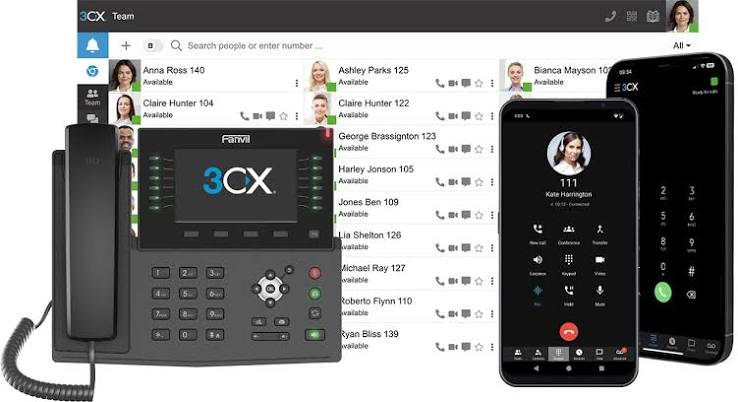
3CX Hosted is a cloud-based phone system that lets businesses use a cloud-based business phone service without having to keep a PBX server on-site. The platform is powered by 3CX’s cloud infrastructure and enables business calling, video conferencing, messaging and contact centres, all on a single communication platform. Business extensions are available for use on the employee’s desktop, mobile devices, and web browsers. This enables organisations to control communication between offices, remote teams, and various sites.
In the UAE and GCC, communication systems are required that can accommodate distributed employees, customer service, and multiple office locations. Older PBX systems can add to hardware, maintenance, and administration costs. 3CX Hosted responds to these by moving the phone system to the cloud with managed infrastructure. Netmate IT is a company that helps businesses evaluate their communication needs, choose appropriate 3CX licensing, set up SIP trunks and extensions, and deploy 3CX. Netmate IT provides IT services implementation and technical support to various organizations in the UAE, GCC, Kenya, and Nepal for more than 12 years.
Key Features
1. Fully Managed Cloud PBX Hosting
With 3CX Hosted, businesses won’t have to deal with the operating system or underlying PBX server infrastructure. 3CX deploys the instance, sets up the necessary firewall rules, applies security patches, and updates software. It also continuously checks the systems hosted on it for system and security-related issues. It saves internal IT teams managing the infrastructure while maintaining the business phone system in the Managed Cloud environment.
2. Centralized Business Communication
3CX combines business telephony, video conferencing, messaging, and live chat into a single platform. All employees have access to a common interface for managing calls, communicating with colleagues, and interacting with customers. This means that there is less need to switch between different communication apps. Communication becomes easier to administer across different departments as businesses can manage extensions, users, and call-handling configurations from a central point.
3. Remote Workforce Connectivity
Access to their business phone extensions is available from the 3CX Web Client, desktop application, and mobile applications. They can place and receive business calls without having to rely on a landline telephone. This is for organisations with remote workers, field teams, and branch offices. Workers may continue to stay connected with the workplace, with respect to the Internet and the configuration of their systems, from different locations.
4. Advanced Call Routing and Queue Management
3CX offers call handling capabilities including digital receptionists, ring groups, call queues and IVR. Incoming calls can be directed towards a department, employee, or support team. Queue management enables incoming calls to be spread among the staff members available, and IVR enables the caller to choose the department they want to go to. These features aid in customer service and sales to handle incoming inquiries and distribute calls throughout the busy period.
5. SIP Trunk and IP Phone Integration
3CX Hosted enables connection to compatible SIP trunk providers in order to make and receive business calls. The cloud PBX can be integrated with the organization’s business telephone numbers and can be used to control voice communication. A 3CX Session Border Controller (SBC) or a supported router phone can also be used to connect to the hosted system with compatible IP phones. This enables businesses to integrate desk phones with desktop and mobile communication apps.
6. Centralized Administration and System Monitoring
All 3CX extensions, users, call routing, and communication settings can be managed via the 3CX admin interface. Infrastructure monitoring, operating system maintenance, and software updates are also part of the hosted service. This will help you to avoid the hassle of routine hosting and regular PBX configuration. 3CX will take care of the hosted component, allowing businesses to focus on communication process management. But organizations still have to configure backups and some operational tasks.
Supported Products / Platforms
| Platform / Technology | How It Helps |
| 3CX Phone System | Provides the central platform for business calling, extensions, call routing, and unified communications |
| 3CX Web Client | Allows employees to make calls, manage contacts, and access communication features through a web browser |
| 3CX Desktop App | Provides desktop access to business calling, messaging, contacts, and other communication tools |
| 3CX Mobile Apps | Allows employees to use their business extensions and communication features through iOS and Android devices |
| SIP Trunk Providers | Connects the hosted PBX to external telephone networks for inbound and outbound business calls |
| 3CX SBC | Establishes secure connectivity between compatible office IP phones and the remotely hosted 3CX system |
| Compatible IP Phones | Provides physical desk-phone access to the cloud-based communication system through supported connectivity methods |
| 3CX Video Conferencing | Supports online meetings and video communication through the 3CX platform |
Common Use Cases
3CX Hosted is an ideal solution for businesses seeking to migrate their business telephony to the cloud. Let’s take an example of a company that is based in Dubai but has staff in multiple locations. Its sales team requires access to business extensions, and its customer support agents must receive incoming enquiries on call queues. With a cloud-hosted phone system, these workers can access one system instead of having to have a separate PBX server at each place of operation.
It is also convenient for companies that have employees working remotely, or businesses that have customers face to face. A healthcare provider in Abu Dhabi may set up queues for appointment calls, and a hotel group may have to send all incoming enquiries to reservations, reception, or customer service. Business extensions can be used by sales teams on the go and managed centrally within the IT department for user and call configurations. These scenarios assist organizations to communicate consistently between various working environments.
Real-World Deployment Scenarios
- Corporate Offices, Dubai: A business moves its traditional PBX system to 3CX Hosted. Employees use desktop applications and compatible IP phones to manage internal and external calls through a centralized system.
- Healthcare, Abu Dhabi: A healthcare provider configures dedicated call queues and IVR options for appointment enquiries, patient support, and general reception calls.
- Hospitality, UAE: A hotel group connects its reception and reservations teams to a cloud-based phone system, allowing employees across locations to manage incoming calls through assigned extensions.
- Multi-Branch Retail, UAE: A retail organization connects its branches to a centralized 3CX system. Employees can communicate through internal extensions and follow common call-routing configurations.
- Remote Sales and Support Teams: A company provides employees with 3CX mobile and desktop applications, allowing them to handle business calls while working outside the main office.
- Regional Operations, GCC and Africa: An organization with offices in different countries uses centralized communication management to connect employees and coordinate customer enquiries across locations.
Why Choose Netmate IT?
Setting up 3CX Hosted is not just about installing a cloud phone system. Businesses have to set up SIP trunks, set up extensions, configure call queues, provision compatible IP phones, and set up call-routing rules. They also have to plan for access by users, and ensure that the communication system meets their working needs. Netmate IT assists businesses in meeting these needs. We provide you with support for solution planning, selecting the right licensing, deployment, configuring SIP trunking, user setup, and integration with your existing communication solution.
Netmate IT has more than 12 years of experience in providing IT infrastructure and technology services to enterprises in the UAE, GCC, Kenya, and Nepal. We accompany and assist in the deployment of organisations and offer technical support according to the needs of the organisations. If you are using an existing PBX, need to link multiple offices, or you want to migrate your business communications to the cloud, we will help you set up 3CX Hosted according to your needs. You will have a proven regional IT partner who can help you with your business communications environment.
Frequently Asked Questions
1. What is 3CX Hosted (Cloud Deployment)?
3CX Hosted is a cloud-based business communications platform in which 3CX hosts the infrastructure. It offers the same features of business calling, video conferencing, messaging, and call management, but without the need to have the business’s own PBX servers. Users can use the system via supported desktop applications, mobile applications, and a web browser.
2. What is the difference between 3CX Hosted and 3CX Self-Hosted?
The provider is responsible for the cloud infrastructure, operating system, security patches, software updates, and system monitoring with 3CX Hosted. With 3CX Self-Hosted, businesses deploy the phone system in their own cloud environment, such as AWS, Google Cloud, Azure, or DigitalOcean. The organization or its IT partner then manages the hosting infrastructure and the maintenance of the associated infrastructure.
3. Does 3CX Hosted require an on-premises PBX server?
No. 3CX Hosted is hosted in the cloud, which means that businesses don’t have to buy and maintain a dedicated PBX server on their premises. The system can be accessed by employees via supported applications and compatible IP phones. But there’s still a need for businesses to have a reliable Internet connection, appropriate network hardware, and compatible telephony systems.
4. Can employees use 3CX Hosted from different locations?
Yes. The 3CX Web Client, desktop application, and mobile apps provide employees with access to their business extensions. They would be able to receive and place business calls, even if they were not in the office. This aids with remote work, multiple branches, and distributed customer service teams.
5. Can 3CX Hosted connect with existing SIP trunks and IP phones?
Yes. 3CX Hosted supports SIP trunk providers that support both inbound and outbound calling. Community businesses can also link IP phones that are supported with a 3CX SBC or compatible router phone. IP phones, however, cannot connect directly using STUN to a 3CX-hosted instance. Before deploying, compatibility/connectivity should be evaluated.
6. Who manages updates, security, and backups in 3CX Hosted?
3CX will take care of all the infrastructure monitoring and security patches, software updates, and the hosted operating system. But the hosting service does not come with a comprehensive backup and disaster recovery solution for business configuration information, call history, recordings, and voicemails. Organizations will need to set up and manage their own backup plans with supported remote storage.
7. How does Netmate IT help with 3CX Hosted deployment?
Netmate IT can assist businesses when choosing the right 3CX licensing, planning the cloud deployment, setting up SIP trunks, defining extensions, and setting up call-routing workflows. Our team also helps with phone legato (compatibility), user access, and integration needs. We offer deployment services and technical help to keep the business cloud-based communication system in operation.
Reviews
There are no reviews yet.