

Description
3CX Managed PBX
Running a phone system usually means looking after servers, operating systems, and updates. 3CX Managed PBX takes that work off your plate. It’s a cloud-hosted phone system built on the 3CX unified communications platform, and it brings business calling, video meetings, live chat, and messaging into one place. 3CX looks after the infrastructure, so your team doesn’t have to maintain PBX hardware or a self-hosted setup.
Netmate IT helps businesses across the UAE, GCC, Kenya, and Nepal set up and manage their 3CX environments. With more than 12 years in IT infrastructure, the team covers hosting requirements, SIP trunk integration, extension setup, IP phone provisioning, and migration from older PBX systems. The goal is simple: reliable business communication with less technical work on your side.
Key Features
1. Fully managed cloud hosting
You no longer need a dedicated PBX server on your premises. 3CX takes care of the hosted infrastructure, operating system maintenance, security patches, and version upgrades. Your team still controls extensions, users, and call routing, but without the routine server work. For internal IT teams, that means fewer infrastructure tasks to juggle.
2. 24/7 monitoring and maintenance
Your phone system has to work every day, so it needs steady attention. 3CX Hosted PBX includes round-the-clock monitoring, security maintenance, and stable version upgrades. Nightly configuration backups give you an extra layer of protection if you ever need to restore the system. The result is less maintenance for you and a communication environment that’s always being watched.
3. Automatic security and firewall setup
A PBX that connects to the internet needs solid security and the right network configuration. 3CX Hosted PBX sets up the required firewall rules automatically and applies security patches and software updates. That cuts down on manual administration and helps keep your hosting environment properly configured. You can also manage user access and administrator permissions right from the phone system.
4. One place to manage calls and extensions
A single management interface lets you configure users, extensions, departments, and call routing. Administrators can send incoming calls through IVR menus, call queues, and business hours rules. This makes it much easier to run communication across several departments and offices without separate PBX systems for each one.
5. Communication tools in one platform
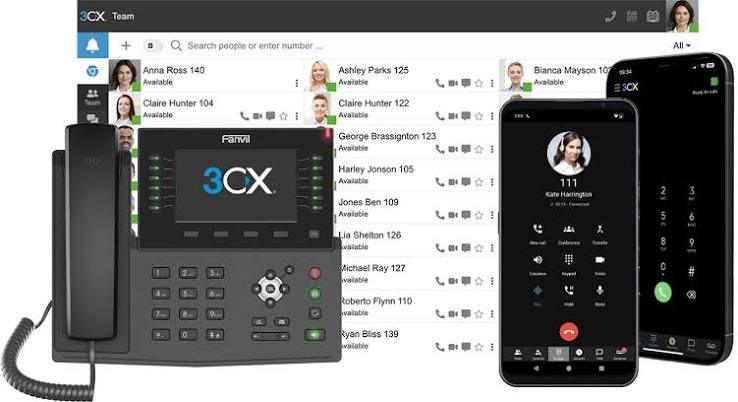
3CX brings calling, video conferencing, instant messaging, and supported customer channels together. Employees can reach their business extensions through supported web, desktop, and mobile apps. That means office staff and remote workers use the same phone system, and nobody has to rely only on a desk phone.
6. Room to grow
3CX Managed PBX works with SIP trunks and compatible IP phones, so you can connect your telephone services and devices based on what you need. Because it’s cloud-based, adding people, extensions, or office locations is easier. You don’t have to install a new physical PBX server each time you grow.
Supported Products and Platforms
| Platform / Component | Role in Managed PBX |
| 3CX Hosted PBX | Cloud-hosted business phone system with managed infrastructure |
| SIP Trunk Providers | Connect the PBX to external telephone networks |
| IP Phones | Provide desk-based VoIP calling |
| 3CX Web Client | Browser-based access to business communication |
| 3CX Desktop Applications | Desktop access to calls and messaging |
| 3CX Mobile Applications | Mobile access to business extensions |
| 3CX SBC | Connects supported remote IP phones to the hosted PBX |
| CRM Integrations | Connect supported CRM platforms with business calling |
Common Use Cases
Most teams come to 3CX Managed PBX for one simple reason: they’re tired of looking after a phone system. A company in Dubai, for example, might be ready to retire its old PBX and stop babysitting a server. In Abu Dhabi, a business may want its departments on shared extensions with call queues, so calls reach the right people. A support provider in Sharjah may need IVR and call routing but has no interest in running its own PBX. And a growing company in Kathmandu might just want office staff and remote employees on the same phone system.
The setups are different, but the need behind them is the same. These teams want calls to work reliably without owning all the infrastructure underneath.
Real-World Deployment Scenarios
- Enterprise in Dubai: Replaced its physical PBX hardware with 3CX Managed PBX and now spends far less time on server upkeep.
- Retail business: Linked its Dubai, Sharjah, and Abu Dhabi branches with central extensions and shared call routing.
- Customer support company: Set up IVR menus and call queues so customer enquiries land with the right department.
- Growing IT company: Moved off a self-hosted PBX to cut down on operating system maintenance and day-to-day administration.
- Logistics organization: Connected teams in Dubai and Nairobi on one phone system, with mobile apps for people on the move.
- Professional services firm: Gave remote employees their business extensions through the 3CX desktop and mobile apps.
Why Choose Netmate IT for 3CX Managed PBX?
Netmate IT helps you deploy 3CX Managed PBX in a way that fits your communication needs and your current IT setup. The technical team supports deployment planning, SIP trunk integration, extension configuration, IP phone provisioning, and migration from traditional PBX systems. They don’t treat it as a simple software install. Before anything goes live, they look at your network readiness, your users’ needs, and how calls should be routed.
Netmate is based in Dubai and has over 12 years of IT infrastructure experience, serving organizations across the UAE, GCC, Kenya, and Nepal. The team also helps with configuration, connectivity, and communication issues after deployment. Whether you’re replacing an existing phone system or linking multiple offices through cloud telephony, Netmate helps you build a managed 3CX environment that supports how your business actually works.
Contact: https://netmateit.com/contact-us-netmate-it-solutions/
Frequently Asked Questions
1. How is 3CX Managed PBX different from a traditional PBX?
A traditional PBX usually means your business looks after physical servers, software, and network configuration. With 3CX Managed PBX, the system is cloud-hosted, and 3CX manages the underlying infrastructure. That includes operating system updates, security patches, backups, and monitoring. You spend less time on in-house PBX management.
2. Who manages the infrastructure?
3CX manages the hosting infrastructure for its Hosted PBX service. This covers operating system maintenance, security patches, firewall configuration, nightly backups, and monitoring. You stay in control of your users, extensions, and call routing. Netmate IT helps with implementation and technical support.
3. Can I keep my existing business phone numbers?
In most cases, yes, as long as your telecom provider supports number portability. The move also depends on SIP trunk compatibility and configuration. Netmate IT can review these points with you before deployment.
4. Does it work for multiple office locations?
Yes. You can connect teams in different locations through one central phone system, and set up extensions, departments, and call routing for each office. People can also use their business extensions on supported desktop and mobile apps.
5. How are backups and updates handled?
Automatically. 3CX Hosted PBX runs nightly configuration backups and applies security patches and version upgrades for you, so there’s no routine maintenance to do by hand. It’s still smart to talk through restoration and recovery plans while you’re planning your deployment.
6. Can I use my existing IP phones and SIP trunk providers?
Often you can, as long as they’re compatible with your deployment model and setup. One thing to know: remote IP phones connecting to 3CX Hosted PBX need a supported SBC. Netmate IT can look at your current equipment and connectivity before you migrate.
7. Do I need an in-house IT team to run it?
Not for the hosted server and operating system, since that part is covered. Someone will still need to handle users, extensions, and call routing, though. If you’d like a hand, Netmate IT can support deployment, configuration, and troubleshooting, depending on your service agreement.


Reviews
There are no reviews yet.