

Description
Sophos Red 60 — Next-Generation Firewall
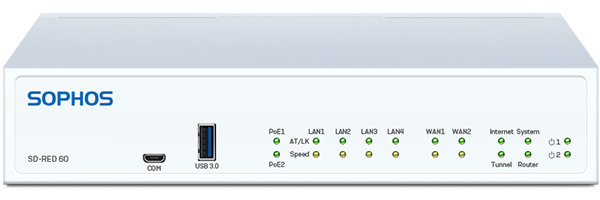
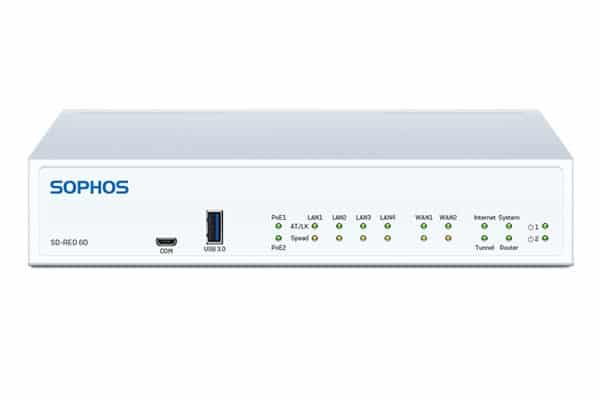
The Sophos SD-RED 60 is a high-performance Remote Ethernet Device built to deliver robust, enterprise-grade connectivity for growing branch offices and demanding edge environments. Capable of delivering up to 850 Mbps of AES-256 encrypted VPN throughput, it removes network complexity by managing encryption, routing, and security policies centrally from your main Sophos Firewall.
Connectivity Category
The hardware configuration features 4 x GbE LAN ports (2 with PoE support), 2 x GbE WAN ports (1 shared with an SFP slot), dual USB 3.0 ports, and a console interface. The expansion slot accepts optional Wi-Fi 5 or 3G/4G LTE expansion cards for wireless WAN/LAN setup.
Why Choose Sophos SD-RED 60?
Unlike complex site-to-site VPN routers, the SD-RED 60 requires zero local configuration. Register the Device ID on your Sophos Firewall, deliver the unit to the site, and allow it to automatically download its configuration over an encrypted connection.
Selection Guide
For Modular Expansion
Choose between the Wi-Fi 5 expansion module for local wireless coverage or the 3G/4G LTE module for cellular failover. Note that the SD-RED 60 contains 1 modular expansion bay.
For Power & PoE Requirements
Verify power demands for connected PoE endpoints (e.g., IP phones or cameras). Connecting a secondary power adapter ensures redundant operation and provides maximum PoE power delivery.
For Rack Mounting
Ensure accurate chassis fit by using the RM-SR-T10 rackmount kit specifically designed for SD-RED 20 and SD-RED 60 models.
For Fiber or Copper Links
Select 1G multimode (ITFZTCHSX) or single-mode (ITFZTCHLX) fiber transceivers or copper SFPs (ITFZTCHTC) according to network cabling requirements.
Always Verify
Confirm that your managing firewall runs supported firmware versions (SFOS 17.5 MR11, SFOS 18.0 MR1, UTM 9.7 MR3, or newer) prior to deployment.
Installation Notes
Setting up the SD-RED 60 is fast and automatic. Register the unit’s Device ID in your central Sophos Firewall. Mount the device using the RM-SR-T10 kit if rack installing, insert any optional expansion card, attach local LAN/PoE devices, and connect WAN ports to ISP modems. Insert SFP transceivers into the SFP cage until secured. Connect the power adapter(s) to initiate automated provisioning over the internet.
Best Practices
Deploy model-specific rackmount kits (RM-SR-T10) rather than standard shelf mounts. Always use official Sophos SFP transceivers for production WAN links. Keep both power supplies connected for mission-critical deployments to ensure zero interruption. Label ports and maintain adequate airflow inside server cabinets.
Benefits for IT Teams
- Simplified hardware management across enterprise branch locations
- Integrated PoE ports eliminate the need for extra power injectors
- Reduced site visits through central configuration and zero-touch setup
- Consistent deployment standards using official accessories
- Seamless technical support path tied directly to the managing firewall
Main Accessory Categories
1. Modular Expansion Cards
Expand connectivity using the integrated modular bay on the SD-RED 60. Options include an 802.11ac Wave 1 (Wi-Fi 5) dual-band wireless module with external antennas or a 3G/4G LTE cellular module for WAN failover and continuous uptime.
2. Rackmount Solutions
The RM-SR-T10 rackmount kit enables clean 19-inch server rack installation for desktop SD-RED 60 appliances. Features include a custom fit, front-facing connections, and fixed power supply mounting.
3. Modules & Transceivers
Compatible 1G SFP optical and copper transceivers for fiber or RJ45 uplinks on the shared SFP/WAN combo interface. Recommended official part numbers include ITFZTCHSX (1G SX), ITFZTCHLX (1G LX), and ITFZTCHTC (1G copper).
4. Power Supply Redundancy & PoE Power
An optional second 12V/PoE DC power supply adapter ensures dual-power supply redundancy and enables full 802.3at/af Power over Ethernet capability across the designated LAN ports.
Why Use Official or Purpose-Built Accessories
- Guaranteed hardware and firmware compatibility with the SD-RED 60 platform
- Seamless central management via the central Sophos Firewall management console
- Secure, model-specific mounting using specialized brackets like the RM-SR-T10
- Dual power input support that guarantees uptime and powers inline PoE devices cleanly
- Clearer support path compared with unlisted third-party options
Six Main Benefits
High-Speed Branch Connectivity
Delivers up to 850 Mbps encrypted VPN throughput across dual WAN interfaces.
Benefit: Provides fast, unthrottled bandwidth for high-demand branch sites.
Power over Ethernet (PoE) Support
Includes 2 x PoE ports supplying up to 30W of combined inline power.
Benefit: Powers IP phones, security cameras, or wireless access points directly.
Professional Rack Mounting
Purpose-built RM-SR-T10 rackmount kit for desktop appliances. Benefit: Clean, reliable installation in standard 19-inch server racks.
Modular WAN Flexibility
Integrated slot accepts 3G/4G cellular or Wi-Fi expansion cards.
Benefit: Adds wireless failover options without external USB peripherals.
Ecosystem Consistency
Accessories designed and tested specifically for Sophos platforms. Benefit: Consistent management, monitoring, and support across all sites.
Plug-and-Protect Deployment
Zero-touch setup requires no local technical installation expertise.
Benefit: Accelerates remote office provisioning while reducing IT overhead.
Typical Use Cases
1. High-Bandwidth Branch Connectivity
Deploy the SD-RED 60 at busy branch locations that require high VPN throughput and dual WAN path redundancy.
2. Direct PoE Device Deployment
Power VoIP phones, surveillance cameras, or access points directly from the SD-RED 60’s PoE LAN ports without needing separate injectors.
3. Server Rack Installation
Utilize the RM-SR-T10 rackmount kit to cleanly integrate the SD-RED 60 into 19-inch server racks.
4. Direct Fiber Uplinks
Use official SFP transceivers like the ITFZTCHLX for single-mode fiber links on the shared WAN/SFP interface.
5. Multi-WAN Cellular Failover
Install a 3G/4G LTE expansion module to automatically route traffic over cellular if wired WAN links fail.
6. Standardized High-End MSP Deployments
Managed Service Providers can standardize branch remote hardware using SD-RED 60 units across high-throughput customer sites.
Who Should Buy Sophos SD-RED 60?
Organizations, enterprise networks, and Managed Service Providers requiring high-throughput, plug-and-play remote connectivity with integrated PoE support for branch offices, clinics, retail hubs, or remote operational facilities.
21. Frequently Asked Questions
What is the Sophos SD-RED 60?
It is a high-performance enterprise Remote Ethernet Device designed to establish a secure AES-256 encrypted VPN tunnel between branch offices and a central Sophos Firewall.
What maximum throughput does the SD-RED 60 support?
The SD-RED 60 delivers up to 850 Mbps of encrypted VPN tunnel throughput.
Does the SD-RED 60 support Power over Ethernet (PoE)?
Yes, the SD-RED 60 includes 2 x PoE ports capable of providing up to 30W of combined power for inline devices like IP phones or access points.
Which rackmount kit works with the SD-RED 60?
The RM-SR-T10 rackmount kit is purpose-built to fit both the SD-RED 20 and SD-RED 60 desktop appliances.
Can I add wireless or cellular connectivity to the SD-RED 60?
Yes, the SD-RED 60 includes a modular expansion bay that accepts either an optional Wi-Fi 5 module or a 3G/4G LTE cellular card.
Where can I find detailed compatibility information?
Sophos Support publishes official compatibility matrices for transceivers, expansion modules, and rackmount kits.

Reviews
There are no reviews yet.