

Description
Sophos SD-RED 20

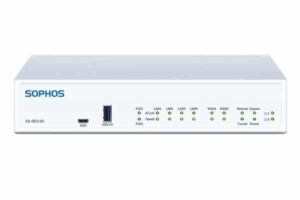
The Sophos SD-RED 20 is a purpose-built Remote Ethernet Device designed to extend your network perimeter to remote employees, branch offices, and industrial locations. Capable of delivering 250 Mbps of encrypted VPN throughput, the SD-RED 20 offloads the complexity of site-to-site networking by handling encryption and tunnel transport centrally.
Connectivity Category
The panel interface hosts 4 x GbE LAN ports, 1 x WAN port, 1 x SFP port (shared with WAN), dual USB 3.0 ports, and a console port. The integrated modular expansion slot accepts optional Wi-Fi 5 or 3G/4G LTE cards, providing flexible connectivity without external dongles.
Why Choose Sophos SD-RED 20?
Unlike traditional remote VPN solutions, SD-RED 20 requires no local configuration. Simply enter the Device ID into your central Sophos Firewall, ship the device, and let it auto-provision over an encrypted connection.
Selection Guide
For Modular Expansion
Determine if the site requires Wi-Fi coverage or cellular backhaul, and select either the Wi-Fi 5 module or the 3G/4G LTE module. Note that the SD-RED 20 features 1 expansion bay.
For Rack Mounting
Identify the appliance dimensions and select the matching RM-SR-T10 Series kit specifically designed for SD-RED 20 / SD-RED 60 models.
For Fiber or Copper Links
Choose 1G multimode (ITFZTCHSX) or single-mode (ITFZTCHLX) fiber or copper SFP (ITFZTCHTC) according to distance and media requirements.
Always Verify
Confirm that your managing firewall runs supported firmware versions (SFOS 17.5 MR11, SFOS 18.0 MR1, UTM 9.7 MR3, or newer) before purchasing.
Installation Notes
Deploying the SD-RED 20 takes minutes. First, register the unit’s Device ID in the central Sophos Firewall. Mount the chassis using the RM-SR-T10 kit if rack installing, insert any optional expansion card, attach local LAN cables, and connect the WAN port to the ISP modem. Transceivers insert into the SFP cage until they click. Finally, plug in the power supply to initiate automatic setup.
Best Practices
Use model-specific rackmount solutions (RM-SR-T10) rather than generic shelves. Prefer official or listed transceivers for production links. Label ports and document which accessory is used where. Maintain airflow around rackmounted appliances. Keep a secondary power supply connected for critical links.
Benefits for IT Teams
- Simplified procurement of known-compatible parts
- Cleaner racks and faster troubleshooting
- Reduced risk of unsupported configurations
- Consistent deployment standards across remote sites
- Clearer support experience directly integrated with central firewall policies
9. Main Accessory Categories
1. Modular Expansion Cards
Add modular expansion cards to the dedicated expansion slot on the SD-RED 20. Options include an 802.11ac Wave 1 (Wi-Fi 5) dual-band module with twin antennas or a 3G/4G LTE cellular module for reliable WAN failover.
2. Rackmount Solutions
The RM-SR-T10 rackmount kit enables professional 19-inch server rack installation for desktop SD-RED 20 appliances. Features include custom fit, front-facing connections, and fixed power supply integration for clean rack layouts.
3. Modules & Transceivers
Compatible 1G SFP optical and copper transceivers for long-distance fiber or RJ45 copper uplinks on the shared SFP/WAN port. Recommended official part numbers include ITFZTCHSX (1G SX), ITFZTCHLX (1G LX), and ITFZTCHTC (1G copper).
4. Power Supply Redundancy
A second, optional 12V DC power adapter (R20ZTCHPS) provides dual-power redundancy, ensuring uninterrupted uptime for critical branch links.
Why Use Official or Purpose-Built Accessories
- Guaranteed hardware and firmware compatibility with the SD-RED 20 platform
- Seamless central management via the Sophos Firewall administrative interface
- Secure, model-specific mounting that protects the appliance using brackets like the RM-SR-T10
- Reliable dual-antenna cellular and Wi-Fi performance exceeding standard USB dongles
- Clearer support path compared with unlisted third-party parts
Six Main Benefits
Flexible Connectivity
Add Wi-Fi 5, 3G/4G LTE, or fiber SFP links as needed. Benefit: Match the remote site medium and speed to business requirements.
Professional Mounting
Purpose-built RM-SR-T10 rackmount kit for desktop appliances. Benefit: Clean, reliable installation in standard 19-inch racks.
Expansion Options
Modular expansion bay accepts wireless or cellular connectivity cards. Benefit: Scale existing edge functionality without full hardware replacement.
Improved Serviceability
Front-facing ports and dual power input support on rackmount layouts. Benefit: Faster maintenance, continuous power uptime, and reduced downtime.
Ecosystem Consistency
Accessories designed and tested specifically for Sophos platforms. Benefit: Consistent management and support experience across all sites.
Zero-Touch Deployment
Plug-and-protect design requires no onsite technical personnel.
Benefit: Rapid, low-cost remote branch rollouts with central firewall management.
Typical Use Cases
1. Rack Installation of Desktop Appliances
Use the RM-SR-T10 Series kit to mount SD-RED 20 units in branch or datacenter racks.
2. Fiber Uplinks
Deploy official SFP modules like ITFZTCHLX for direct 1G fiber WAN connectivity.
3. Redundant Cellular Failover
Install a 3G/4G LTE module into the expansion slot for automatic WAN failover if broadband fails.
4. Integrated Wireless Access Point
Add the optional Wi-Fi 5 module to supply secure wireless local network connectivity for branch staff.
5. High-Availability Power Integration
Connect a secondary 12V DC power adapter to maintain continuous operation during power source disruptions.
6. Standardized MSP Deployments
Adopt consistent rackmount and transceiver choices across multiple remote customer sites.
Who Should Buy Sophos SD-RED 20?
Any organization running Sophos Firewall that needs professional mounting, additional connectivity, or effortless expansion for branch offices, retail outlets, or remote work sites. Ideal for both new deployments and expansions of existing Sophos infrastructure.
21. Frequently Asked Questions
What is the Sophos SD-RED 20?
It is an enterprise Remote Ethernet Device designed to establish a secure AES-256 encrypted VPN tunnel between remote sites and a central Sophos Firewall.
What maximum throughput does the SD-RED 20 support?
The SD-RED 20 provides up to 250 Mbps of encrypted VPN tunnel performance.
Which rackmount Series do I need?
Match the Series to the exact appliance model; the RM-SR-T10 is designed specifically for SD-RED 20 and SD-RED 60 units.
Can I expand connectivity on the SD-RED 20?
Yes, using the built-in modular expansion bay, which accepts either an optional Wi-Fi 5 card or a 3G/4G LTE cellular module.
Do I need official Sophos transceivers?
Official modules are fully supported. Unlisted modules may work but can generate system warnings or support limitations.
Where can I find compatibility information?
Sophos Support publishes transceiver compatibility articles, and individual rackmount Series list supported appliances.


Reviews
There are no reviews yet.